AI Generated Beats Explained: Types, Tools, and How to Use Them

"AI-generated beats" can mean a complete hip-hop instrumental ready for vocals, or a kick-snare-hat pattern you drop into your own session. The term covers both — which is why choosing the right AI beat maker requires knowing which output you actually need.
In 2026, the AI beat generation landscape has matured significantly. Tools like Suno now offer stem separation and MIDI export. Competitors like Moises AI Studio generate context-aware instrumental parts. Yet no tool delivers truly release-ready output without human finishing work. Understanding what each type of AI beat generator actually produces — and what creative labor remains — is essential for any producer considering these tools.
This guide covers:
Why "beats" means different things to different users
The three categories of AI beat generation tools
Step-by-step workflow for creating a beat with AI
How to use AI beats inside a DAW
What each output type requires from you
How to choose based on your workflow and budget
The Terminology Problem: Just Drums vs. Full Instrumentals
When a rapper searches for AI-generated beats, they typically want a complete instrumental they can rap over — drums, bass, melody, and chords all in place. That usage comes from hip-hop, where "beat" has always meant the full backing track. But in electronic or rock production, the very word beat typically means just the rhythmic pattern — a kick-snare-hat arrangement.
These are fundamentally different outputs requiring different tools and different workflows. A complete instrumental means minimal production work but limited creative control — you get what the AI gives you. A MIDI AI drum beat pattern requires sound design, mixing, and arrangement, but allows complete customization. This distinction determines what work remains after the AI finishes. If you are new to programming rhythms yourself, our guide to online drum programming covers the fundamentals.
Now that you understand what type of beats you need, you can actually skip straight to making them. Amped Studio handles both scenarios: its AI Assistant generates complete instrumentals as separate stems — drums, bass, chords, melody — each on its own track. Rap over the full arrangement, or keep just the drum stem and build around it. If you want to understand the full landscape of AI beat tools first — what each type produces and what work remAIns for you to do — read on.
Three Categories of AI Beat Generation
MIDI Generators: Maximum Control, Maximum Work
MIDI generators produce note data, and you can choose what instrument and preset is used to play those notes. Tools like Staccato.ai generate drums, melodies, chords, and basslines as editable MIDI that you drag into your DAW. Unison Audio's Drum Monkey is focused on drums and provides curated drum soundbanks alongside fully editable AI-generated MIDI drum patterns in 30 genres of music.
What you get: Raw musical ideas in MIDI format
What's left for you: Sound selection, mixing, arrangement, production
Best for: Producers who want AI as a composition assistant, not a production replacement
Cost range: Staccato runs $10–12/month for music generation. Drum Monkey from Unison Audio costs approximately $197 one-time and focuses specifically on drum pattern generation.
The advantage: complete creative control. The MIDI is clean, editable, and artifact-free. You choose the drum samples, the synth patches, the mixing approach. The disadvantage: this requires production skills. If you cannot turn MIDI into a finished track, these tools offer little immediate value.
Staccato.ai deserves specific mention for its text-to-MIDI capability — describe what you want in natural language, and it generates corresponding MIDI patterns for drums, bass, chords, or melodies. For producers comfortable working with AI beats in a DAW environment, this integration feels more natural than exporting and importing between separate applications. Drum Monkey takes a different approach: it analyzes hit songs across genres and generates drum patterns based on proven rhythmic frameworks, outputting both audio loops and draggable MIDI.
Stem Generators: Get Individual Parts, Make Your Own Arrangement
Tools like Suno Studio, Moises AI Studio, and Amped Studio generate audio stems — separate tracks for drums, bass, melody, and other elements. Unlike MIDI, these are actual audio files of individual instrument parts that make up the track.
What you get: Multiple audio tracks you can edit independently
What's left for you: Arrangement decisions, mixing, potentially layering real instruments
Best for: Producers who want a starting point they can shape without building from scratch
Cost range: Moises AI Studio runs $4–5/month (Premium) or $10–25/month (Pro). Suno Studio requires the Premier plan at $30/month. Amped Studio offers stem generation at $9.99/month with the Premium+AI plan.

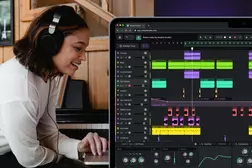
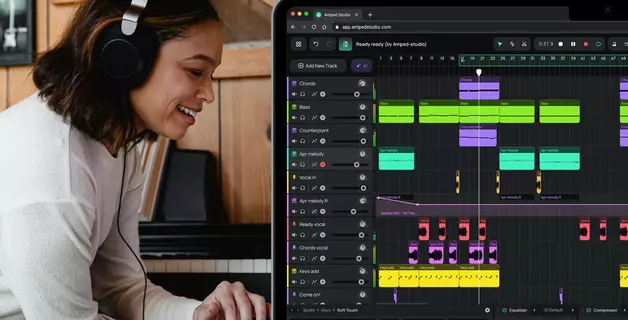
Amped Studio generates multi-track projects with separate stems directly in browser, allowing you to edit, delete, rearrange, and layer additional parts without leaving the application. The AI Assistant produces drums, bass, chords, and melody on individual tracks — particularly useful when you select hip-hop or trap as your genre.
Full-Song Generators: Final Output, Very Limited Control
Tools like Suno (free tier) and Udio generate complete audio — a finished stereo mixdown ready to play. You describe what you want, the AI produces it, and you accept or reject the result.
What you get: A complete track (or complete instrumental if specified)
What's left for you: Essentially nothing — or everything, if you need to fix issues
Best for: Content creators needing background music, rappers wanting quick instrumentals, anyone prioritizing speed over customization
Cost range: Suno free tier offers 50 credits/day (non-commercial). Pro runs $10/month with commercial rights. Udio charges $10/month (Standard) or $30/month (Pro), but exports are currently disabled.
The limitation: what you get is what you get. If your generated AI trap beats have an awkward transition at the chorus, you cannot fix it without regenerating. If artifacts mar the mix, you cannot clean them without external software. Udio's situation illustrates the risks: as of late 2025, the platform disabled all downloads following its Universal Music Group settlement — you can generate but cannot export your creations.
Suno's v5 model represents a meaningful quality improvement over earlier versions. Users report cleaner transient handling, more natural vocal phrasing, and better long-form coherence. The free tier runs v4.5, while paid tiers access v5 — a distinction worth noting when evaluating output quality.
Step-by-Step: Creating a Beat with AI
The workflow varies by tool category, but here is a practical walkthrough using a browser-based stem generator — the middle ground between raw MIDI and finished audio.
Step 1: Choose Your Genre and Parameters
Open your AI beat maker and select a genre preset. Most tools offer categories like hip-hop, trap, lo-fi, house, techno, and cinematic. Set your tempo (BPM) — 70–90 for laid-back grooves, 130–150 for energetic club tracks. Specify the length, typically 30–240 seconds for initial generation.

Step 2: Generate the Initial Project
Click generate and wait 15–30 seconds. The AI analyzes the genre patterns from its training data and produces a multi-track arrangement. In stem-based tools like Amped Studio, this appears as separate tracks: kick, snare, hi-hats, bass, chords, melody, and possibly FX or risers depending on the genre.
Step 3: Evaluate What You Have
Listen through the generated material critically. Identify which elements work for you and which need replacement. Remember that it's up to you if you want to keep just the drum beat or work further with AI's suggestions of all the instrument parts.
Step 4: Delete What Doesn't Work
Remove weak elements entirely. If the melody is uninteresting, remove it. You are not obligated to use everything the AI produces. The generation is a starting point, not a finished product.
Step 5: Reshape the Arrangement
Copy-paste sections to extend the track beyond the initial generation length. Move sections to create build-up tension. Duplicate patterns but mute certain elements for variation. The AI gave you raw material — now apply your own sense of song structure.
Step 6: Layer Your Own Elements
Add your own recordings, samples, or MIDI instruments over the AI foundation. Record a vocal hook. Try layer your favorite drum loop from your own sample library and see how it works with the generated pattern. Add a bass synth that fits your style. This human contribution is where the track becomes distinctively yours. Have fun and improvise!
Step 7: Apply Effects and Mix
Process individual stems with EQ, compression, and spatial effects. Cut low frequencies from everything except kick and bass. Add reverb to create depth. Apply compression so the kick punches through. Basic processing dramatically improves AI output quality.
Step 8: Export
Render your finished track as a stereo file for distribution, or export individual stems if you plan to collaborate with a mixing engineer.
Want to try this workflow yourself? Create a free Amped Studio account to generate your first AI beat and edit it directly in browser — no download required.
Using AI Beats Inside a DAW
Different AI beat tools integrate with traditional DAWs in different ways. Understanding these workflows helps you choose tools that fit your existing production setup.
MIDI Plugin Integration
MIDI generators like Staccato.ai and Drum Monkey work as VST/AU plugins inside your DAW. You instantiate the plugin on a MIDI track, generate patterns within the plugin interface, and the output appears directly on your DAW timeline. This tight integration makes iterating fast — generate, evaluate, tweak, regenerate — all without leaving your production environment.
The limitation: these plugins require a desktop DAW. If you produce entirely in-browser, plugin-based MIDI generators are not an option.
Stem Export/Import Workflow
Audio-based generators like Suno Studio produce stem files you download and import into your DAW. The workflow: generate in the web interface, download the stem pack (usually a ZIP archive containing WAV files), import those WAVs into your DAW session, and arrange them on your timeline.
This workflow is functional but introduces friction. Every regeneration requires re-downloading and re-importing. For serious production where you plan to heavily process the stems anyway, the extra steps are acceptable.
Browser-Based DAW Workflow
Tools like Amped Studio eliminate the export/import cycle entirely. Generation and production happen in the same application. Generate stems, then immediately add effects, record additional parts, and arrange — all in browser. When finished, export once as a final stereo mix or stem pack.
This unified workflow suits producers who want generation and finishing in one place. If you need complex routing or specific third-party plugins, you may still prefer exporting AI stems to a desktop DAW for final production.
Hybrid Approach
Many producers combine workflows: generate initial ideas in a browser-based AI generation tool for speed, then export promising stems to a desktop DAW for serious production.
The Reality Check: What's Actually Usable?
AI music tools attract bold claims. Marketing copy promises "studio-quality beats in seconds" and "professional instrumentals with one click." Social media is filled with impressive-sounding demos, clips and reels. But what happens when you sit down to actually finish a track? Producers and audio engineers who work with these tools daily tell a more nuanced story.
For demos and ideation: AI tools excel. You can sketch ideas rapidly, test concepts, and explore directions that would take hours to produce manually. A rapper can have ten instrumental options in an hour. A producer can audition genre directions before committing to a full production.
For professional release: Significant finishing work remains necessary. Audible digital artifacts require cleanup with tools like iZotope RX. Many producers report best results when using AI output as a foundation, then layering real instruments or replacing problematic elements. The AI gives you 60–70% of a track; you supply the finishing 30–40% that makes it release-worthy.
For producing beats commercially: The legal landscape remains complex. Tracks generated entirely by AI may not qualify for copyright protection under current US copyright guidance. Substantial human creative contribution strengthens ownership claims. If you plan to license beats to other artists, it may be a good idea to document your modifications of the AI-generated material.
For learning: These tools offer genuine educational value. Analyzing how AI constructs chord progressions or arranges song sections can accelerate your understanding of production principles.
Looking for a free tool to experiment with? Both Suno (50 daily credits) and Amped Studio (one generation per 24 hours on free tier) let you try AI beat generation without payment. Start there to understand what these tools actually produce before deciding whether premium features justify subscription costs.
Choosing Based on Your Workflow
| Tool | Output | Editability | Cost | Best For |
|---|---|---|---|---|
| Staccato.ai | MIDI | Full | $10-12/month | Composition assistance |
| Drum Monkey | MIDI + Audio | Full | $297.00 | Drum patterns across 30 genres |
| Suno | Full audio | None | $10-30/month | Quick beats, content creation |
| Suno Studio | Stems + MIDI | High | $30/month | AI Stem |
| Moises AI Studio | Context-aware stems | High | $4-25/month | Adding parts to existing recordings |
| Amped Studio | Audio + Multi-track stems | Full DAW | free -$12.99/month | Browser-based generation and finishing |
| Udio | Full audio | None | $10–30/month | Note: Exports currently disabled |
The decision depends on how much of the production process you want to control. More control means more work but also more creative ownership — both legally and artistically.
If you primarily need quick instrumentals for content creation, full-song generators offer the fastest path. If you want to develop production skills while using AI as a creative partner, stem generators strike a better balance. If you already have strong production skills and want AI purely for composition ideas, MIDI generators preserve your complete control over the final sound.
Key Takeaways
The terminology matters. "Beats" means drum patterns to some users and complete instrumentals to others. Knowing which you need determines which tools make sense.
Three output types exist. MIDI gives maximum control but requires production skills. Stems offer editable parts but have bleed issues. Full audio is fastest but least flexible.
No single tool is release-ready (yet). Every AI music tool in 2026 requires human finishing work for professional results. The question is how much work and what kind.
Cost reflects control. Free tiers deliver complete audio you accept or reject. Paid tiers unlock more options such as stems access, MIDI export, and editing capabilities that enable real production work.
Your contribution matters. Both legally and artistically, the creative decisions you make after generation — arrangement, mixing, layering, replacement — determine whether the result is generic AI output or something distinctively yours.
Workflow integration differs. MIDI generators plugin directly to desktop DAWs. Stem generators require export/import steps. Browser-based tools like Amped Studio keep generation and production in one environment.
Ready to try AI beat generation with full editing control? Amped Studio lets you generate multi-track instrumentals and finish them in the same browser-based environment — no separate tools, no export friction, no installation required.
FAQ
What does "AI generated beats" actually mean?
The term covers two different things: drum patterns (kick, snare, hi-hat arrangements) and complete instrumentals (full backing tracks with all elements). Context determines which meaning applies — rappers usually mean instrumentals, while producers in other genres often mean drum patterns specifically.
Can I use AI beats commercially?
Yes, with caveats. Paid tiers typically include commercial licenses. However, tracks created entirely by AI without human contribution may lack copyright protection. Adding your own arrangement, recording, or mixing work strengthens your legal ownership.
Are AI beats good enough for professional release?
For demos and content creation, yes. For commercial release, treat AI output as a starting point. Stem bleed, artifacts, and generic arrangements typically require finishing work — layering real instruments, EQ cleanup, and creative arrangement decisions.
What is the best free AI beat maker?
Suno offers 50 free credits daily, producing complete instrumentals with no editing capability. Amped Studio gives you full editing capabilities afterward — you can delete, rearrange, add effects, and layer your own recordings.
How do I use AI beats in a DAW?
MIDI tools like Staccato and Drum Monkey work as VST plugins, generating editable patterns inside your DAW. Audio-based tools require exporting stems and importing them. Browser-based options like Amped Studio function as self-contained online DAWs, eliminating export steps entirely.
Which AI beat generator has the best audio quality?
Suno v5 (paid tiers) currently produces the cleanest full-song output. For stem workflows, quality varies — all generators exhibit some amount of audible digital artifacts. MIDI generators avoid audio quality issues entirely since you only get note content and choose synth or drum machine presets that play them yourself.
Can AI make trap beats specifically?
Yes. Most AI tools include trap as a genre preset. The AI generates characteristic trap elements: 808 bass patterns, rapid hi-hat rolls, atmospheric pads, etc. Results vary by tool — evaluate several before committing to one platform for your AI hip hop beats and AI trap beats production needs.