In digital mastering, professionals often prefer iZotope Ozone — a highly regarded tool for finalizing tracks that’s compatible with a wide range of digital audio workstations (DAWs).
A standard mastering chain typically includes five essential stages: equalization, compression, saturation, stereo enhancement, and limiting. Let’s take a closer look at each of these processes.
How to master a track
1. Mastering Equalizer (Correcting Mixing Issues)
Low-pass filtering: Use a low-cut filter to remove excessive low-end rumble. Set the slope between 12 and 48 dB and filter out frequencies below 35–40 Hz.
High-pass filtering: Apply a high-shelf or high-cut filter to reduce harsh highs. Set the slope to 12 dB and begin attenuation around 10,000 Hz to avoid overloading the top end.
Mono low-pass processing: Improve mono compatibility by converting frequencies below 100 Hz to mono using tools like the Brainworx bx_digital V3 or iZotope Ozone Imager.
Resonance removal: Use Brainworx bx_digital V3 to identify and reduce resonant peaks across the spectrum.
Mid/Side equalization: For a clean stereo image, cut frequencies below 100 Hz on the side channel. This enhances stereo clarity and prevents muddiness.
Stereo image expansion: Add high-end content to the side channel using mid/side EQ — this creates a wider, more immersive sound.
Frequency balancing: Adjust the overall spectral balance to avoid peaks and dips using Tonal Balance Control — helping you achieve a smooth and pleasant tonal profile.
2. Mastering Compression
Apply gentle compression with tools like The Glue, targeting 2–3 dB of gain reduction at a 2:1 ratio. For cleaner low-end, use a compressor with a high-pass sidechain filter up to 100 Hz.
If certain high-frequency transients are difficult to manage with EQ alone, use frequency-dependent compression to tame them more precisely.
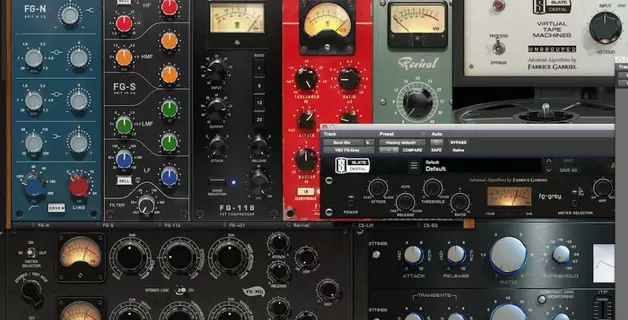
Some of the best compressors for mastering: Waves SSL Comp, Slate Digital FG-MU, Waves PuigChild 670.
3. Applying Saturation
If saturation wasn’t applied during the mixing stage, the result may be a dull-sounding track. It's advisable to add saturation while working with group channels or individual instruments. If returning to the mix isn’t possible, you can apply general saturation to the entire mix. In this case, a multiband saturator such as FabFilter Saturn is a strong choice — it allows precise saturation across different frequency bands.
4. Expanding the Stereo Field
Stereo imbalances that weren’t addressed during mixing can be corrected using multiband stereo expanders. iZotope Imager is one such tool that can help. Expansion should be applied with respect to frequency range — high frequencies can be widened more significantly than low frequencies. Reference tracks in a similar genre are useful for setting a well-balanced stereo image.
5. Limiting and Maximizing
To bring your track to commercial loudness levels while preserving sound quality, use a limiter. This increases the overall volume without compromising frequency balance and dynamic range. However, ensure that limiting doesn’t introduce distortion, especially in the high end. Use reference tracks to fine-tune settings and maintain audio integrity.
Mastering Secrets
The key to high-quality mastering lies in the harmonious distribution of instruments achieved during the mixing stage. If the mix is poorly executed, mastering becomes a corrective process — far removed from its intended purpose. Therefore, careful and precise mixing forms the foundation for successful mastering.
How to Prepare a Track for Mastering
Provide a reference track — This helps the mastering engineer understand the desired sound.
Export format — Use WAV format with 24-bit / 48,000 Hz settings.
Peak level — Ensure the peak level doesn’t exceed -2 to -3 dB.
Disable processing on the master bus — Before exporting, turn off all effects on the master bus, including limiters, equalizers, compressors, and others.
When Is Mastering Needed?
Mastering is essential to ensure your track meets the loudness standards typical of your genre. Without mastering, a track might sound quiet, flat, or less expressive compared to commercially released songs.
What RMS Level Should a Track Have After Mastering?
On average, the final RMS value should fall between -8 and -6 dB. This range strikes a balance between loudness and dynamic range, aligning with the norms of most modern music genres.
Is It Possible to Do Mastering at Home?
Yes — mastering can absolutely be done at home. However, the quality of the final result heavily depends on the engineer’s experience and the acoustic environment. Proper studio acoustics and high-quality monitoring equipment are crucial. The mastering engineer must clearly hear and assess every subtle change. Without professional tools and a trained ear, achieving a polished, release-ready sound at home can be a significant challenge.
Best Plugins for Mastering
Effect chain optimization
The market offers a wide range of mastering plugins, each with its unique sonic characteristics. To achieve the best results, test various tools and select those that best meet your creative and technical needs. We use over ten tools in our arsenal — and are always open to adding more based on mixing demands.
Plugin chain consistency is essential — each tool can be used multiple times in a single session to maximize its benefits.
1. Precision Equalizers for Mastering
Precision EQs give you tight control over tonal balance, letting you fine-tune the frequency spectrum. They allow precise boosts or cuts to shape a clean and balanced sound without unwanted resonances.
Use M/S (Mid/Side) processing to enhance the stereo image, remove unwanted low-frequency rumble, and add clarity to the top end.
Popular EQs for mastering:
Three Body Technology — Kirchhoff EQ
DMG Audio — Equilibrium
Sonnox — Oxford EQ
Maat — TheEQ
FabFilter — Pro-Q
Softube — Weiss EQ1
Brainworx — BX_Digital
Tokyo Dawn Labs — Slick EQ M (Mastering Edition)
Newfangled Audio — Equivocate
Crave DSP — Crave EQ
Sonnox — Claro
2. Best Compressors for Mastering
Using a mastering compressor allows you to give your track extra density and integrity. To preserve the dynamic range, it is recommended to limit compression to 2–5 dB. Excessive compression can negatively impact the sound, making it flat and lacking in depth. Alternatively, consider using parallel compression to improve the sound.
Here are some of the best compressors for mastering available on the market:
Softube — Summit Audio Grand Channel / Weiss Compressor
Softube — Drawmer S73
Cytomic — The Glue
Tokyo Dawn Labs — TDR Kotelnikov GE
Pulsar Audio — Mu
Vertigo Sound — VSC-3
Softube — Chandler Limited Germanium Compressor
DDMF — Magic Death Eye
DMG Audio — TrackComp
UAD — Shadow Hills Mastering Compressor
Shadow Hills Mastering Compressor
SKnote — SDC Stereo Double Compressor
SPL — Iron Mastering Compressor
3. Equalizers That Will Add “Color” and Analog Harmonics
Coloring EQs can add dimension to your sound and warmth to raw recordings. Many of these plugins emulate classic analog equalizers, offering harmonic character that enhances a mix's musicality.
Here are some popular color EQs:
Chandler Limited — Curve Bender
Waves — PuigTec EQP-1A
Softube — Tube-Tech
Sonimus — Burnley 73
Maat — TheEQ Orange
Kush Audio — Electra DSP
Kush Audio — Clariphonic
Maag Audio — EQ
Manley — Massive Passive
Native Instruments — Passive EQ
Elysia — Museq
SPL — PassEQ
Pulsar — Massive
4. Plugins for Eliminating Sibilance
Why use a de-esser when mastering? These plugins help soften harsh vocals, hi-hats, and synth sounds. Our hearing is particularly sensitive to certain high frequencies, which can be reduced using de-essers to achieve a smoother, more pleasant sound.
Recommended de-essers:
Eiosis — e²Deesser
Airwindows — DeEss
FabFilter — Pro-DS
Oeksound — Soothe
Sonnox — Oxford SuperEsser
DMG Audio — Essence
HOFA — IQ-DeEsser
Hornet — Sybilla
Weiss — DS1
5. Dynamic Equalizers and Multi-Band Compressors
While not always necessary, dynamic equalizers and multi-band compressors can be extremely useful in mastering. They allow precise control over specific frequency bands, particularly when dealing with problematic or harsh frequencies in a mix.
Use cases:
Taming harsh frequencies only when they become problematic
Gently compressing selected bands for balance
Enhancing clarity and punch in dynamic content
Recommended plugins:
FabFilter — Pro-MB
Oxford — Dynamic EQ
FabFilter — Pro-Q 3
iZotope — Ozone
Leapwing Audio — DynOne
Waves — C6
Softube — Drawmer 1973
DMG Audio — Multiplicity
6. Saturation and Harmonic Enhancement Plugins
These tools are used to add analog-style warmth, richness, and depth to your mix. They simulate the coloration and harmonic distortion produced by analog gear such as tape machines, tube amplifiers, and transformers. Use them to enhance high frequencies, add grit to mids, or bring a fuller, warmer character to your sound.
These plugins are ideal for introducing subtle or pronounced analog flavor in your mastering chain, helping your track sound more musical and engaging.
Here are some of the best plugins for saturation and harmonic enhancement:
Wavesfactory — Spectre
Tone Projects — Kelvin Tone Shaper
Vertigo Sound — VSM-3
Shattered Glass Audio — SGA1566
Kazrog — True Iron
Kush Audio — Omega
SKnote — Roundtone
Klanghelm — SDRR
SPL — TwinTube
IK Multimedia T-RackS — Tape Machine Collection
Slate Digital — Virtual Tape Machines (VTM)
London Acoustics — Taipei
U-He — Satin
Waves — Kramer Master Tape
These plugins offer various modes of saturation — from subtle harmonic shimmer to thick analog tape emulation. Use them creatively to enhance different frequency areas and glue your mix together with rich analog tone.
7. Stereo Expansion and Sound Depth
Stereo image enhancement plugins help widen your mix and add spatial dimension, making your track sound larger and more immersive. These tools are particularly useful in mastering to subtly open up the soundstage without compromising mono compatibility.
When using stereo expansion, always monitor your mix in mono to avoid phase cancellation and ensure your mix translates well across all playback systems.
Here are some plugins for stereo widening and enhancing perceived depth:
Mathew Lane — DrMS
Leapwing — StageOne
SideMinder ME
Goodhertz — Midside
Waves — S1 Stereo Imager / Center
Flux — Stereo Tool
Nugen Audio — Stereoizer
Tokyo Dawn Labs — Proximity
Apply stereo widening selectively — often high-frequency content (like cymbals and reverbs) can be spread wider, while low frequencies are best kept centered. Reference professional tracks to guide your adjustments.
8. Limiters
Limiters are essential in the final stage of mastering to increase the overall loudness of a track while preserving dynamic range and avoiding distortion. A good limiter should enhance perceived volume without squashing transients or introducing artifacts.
Look for limiters that maintain transparency and don’t overly color the signal. Many modern plugins offer precise metering and intelligent gain algorithms to help optimize loudness.
Here are some of the most respected limiters for mastering:
DMG Audio — Limitless
A.O.M. — Invisible Limiter
iZotope — Ozone Maximizer
Eventide — Elevate
IK Multimedia — Stealth Limiter
Sonnox — Oxford Limiter
Voxengo — Elephant
Sonible — smart:limit
Chandler Limited — Zener Limiter
Use limiters to achieve final loudness standards like -14 LUFS for streaming platforms, while still ensuring musicality and impact. Compare your master against reference tracks to avoid over-limiting.
9. Analyzers
Analyzers are critical tools in the mastering process for visualizing and measuring the sonic characteristics of your mix. They help you monitor loudness, frequency balance, stereo spread, and phase correlation — all essential for delivering professional-quality masters.
Use analyzers to identify problems such as imbalanced frequency distribution, excessive dynamic range, or stereo imaging issues. They also help ensure your track meets loudness targets across different platforms.
Here are some widely used analyzer plugins:
Voxengo — SPAN
MAAT — 2BusControl
Youlean — Loudness Meter
MeldaProduction — MLoudnessAnalyzer
Nugen Audio — VisLM / MasterCheck
iZotope — Tonal Balance Control / Insight
Sample Magic — Magic AB
MeterPlugs — Loudness Penalty
Sonnox / Fraunhofer — Pro-Codec
MAAT — DRMeter MkII
ADPTR Audio — Metric AB
Orban — Loudness Meter
These tools allow mastering engineers to make informed decisions based on objective metrics, ensuring that their work translates well across various playback systems and meets commercial standards.
10. Programs for Correction of Headphones and Monitors
Accurate monitoring is essential in mastering. Even the best plugins can’t compensate for poor room acoustics or uncalibrated headphones. That’s where correction tools come in — they optimize your listening environment, ensuring that what you hear is as true to the source as possible.
These tools measure and adjust the frequency response of your headphones or monitors to deliver a more balanced and natural sound. Room correction software can also flatten out irregularities caused by reflections and standing waves in untreated spaces.
Here are some popular tools for acoustic and headphone correction:
Sonarworks — Reference 4 / SoundID Reference
IK Multimedia — ARC System
dSONIQ — Realphones
ToneBoosters — Morphit
Room EQ Wizard
112dB — Redline Monitor
Slate Digital — VSX Headphone System
Goodhertz — CanOpener Studio
Waves — NX
Audified — MixChecker
Implementing these tools helps reduce listening fatigue and improves your ability to make precise adjustments. This is especially crucial when working in less-than-ideal acoustic environments or relying on headphones for final checks.
Reviews of Popular Mastering Plugins
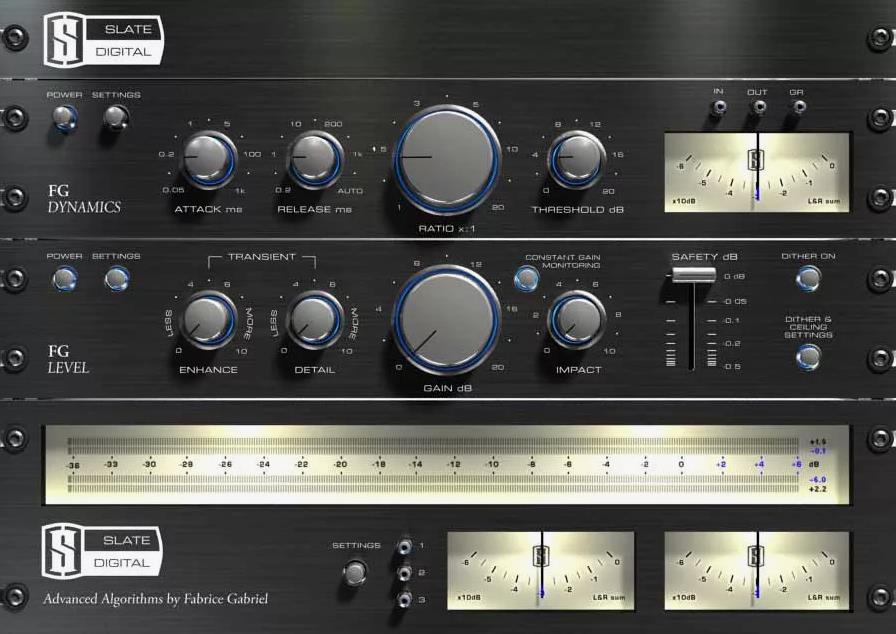
1. FG-X 2 from Slate Digital
FG-X 2 from Slate Digital is a feature-rich mastering tool packed with functions suitable for any music genre or style.
Thanks to its transparent dynamics control and sound enhancement capabilities, this plugin is an excellent choice for improving the quality of your tracks.
One of FG-X 2’s standout features is Intelligent Transient Preservation (ITP) technology, which ensures that transient details are preserved even during heavy compression or limiting. This allows for loud and energetic mastering while retaining the natural dynamics and expressiveness of your music.
Another important component of FG-X 2 is the adjustable Lo-Punch and Detail parameters, which allow for precise tuning of low and high-frequency content. Adjusting these settings helps add power and clarity to your tracks, ensuring a professional sound across different audio systems.
Adjustable Lo-Punch and Detail controls for enhancing low and high frequencies
Variable high-pass filter to manage low-frequency noise
Extensive metering for volume and dynamics monitoring
When using the Lo-Punch parameter, consider automating its intensity across different song sections — increase it during choruses for greater impact and reduce it during verses for a more balanced sound. This technique helps create more dynamic masters that hold the listener’s attention throughout the track.
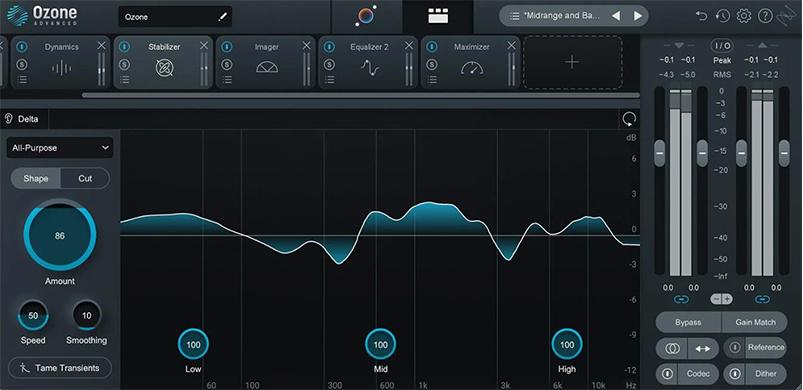
2. IZotope Ozone 10
iZotope Ozone has long established itself as a favorite among music producers and mastering professionals, thanks to its high-end features and intuitive interface. The latest version, Ozone 10, continues this legacy by expanding the boundaries of digital mastering with innovative tools and enhancements.
Ozone 10 features a redesigned user interface, improved performance, and enhanced audio capabilities. This mastering suite includes an equalizer, compressor, limiter, stereo imaging tools, and more — making it an essential plugin for achieving professional-sounding masters.
Among the standout features of Ozone 10 are Master Rebalance and Low-End Focus. Master Rebalance allows you to adjust the volume of vocals, bass, and drums without affecting the rest of the mix. The Low-End Focus module improves clarity and adds energy to low-frequency content, ensuring deep and rich sound on all playback systems.
Key features:
Intelligent Mastering Assistant for fast, AI-powered recommendations
Master Rebalance to adjust mix element volumes without re-rendering
Low-End Focus for enhancing clarity and punch in bass frequencies
Tonal Balance Control to help achieve consistent tonal balance
Comprehensive metering tools for loudness, dynamics, and frequency analysis
Use iZotope Ozone 10’s AI-powered Mastering Assistant to quickly analyze your mix and generate personalized settings. This saves time and provides a solid starting point, helping ensure your final master is polished and commercially viable.
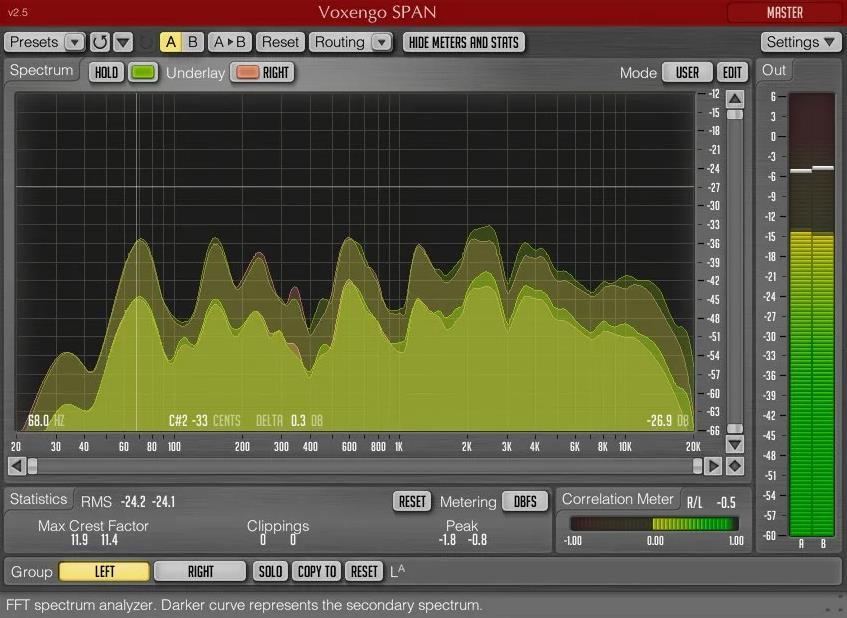
3. SPAN by Voxengo
If you’re looking for a powerful free mastering tool, Voxengo’s SPAN is a great choice. This advanced spectrum analyzer gives you real-time visual feedback of your audio signal, making it an essential tool for identifying and correcting frequency imbalances.
One of the notable features of SPAN is the ability to customize the appearance of the spectrum analyzer display. You can customize the visualization of your audio to suit your preferences and workflow, helping you better understand the frequency structure of your mix and make more precise adjustments during mastering.
Another standout aspect of SPAN is its built-in real-time correlation meter, which helps track phase issues in your mix. By keeping an eye on this indicator, you can quickly identify and correct potential phase problems, ensuring your master sounds great on both stereo and mono playback systems.
Main characteristics:
Customizable spectrum analyzer display;
Real-time correlation measurement to monitor phase problems;
Adjustable frequency resolution for accurate analysis;
Stereo, mid and surround channel options for comprehensive monitoring.
Use a correlation meter to identify possible phase problems in your mix. For example, if you notice a consistently negative correlation value in a particular area of your composition, try changing the phase of individual elements (such as a stereo guitar track or a drum mic) to improve the correlation readings. This will help avoid phase cancellation problems that can occur when playing a track in mono.
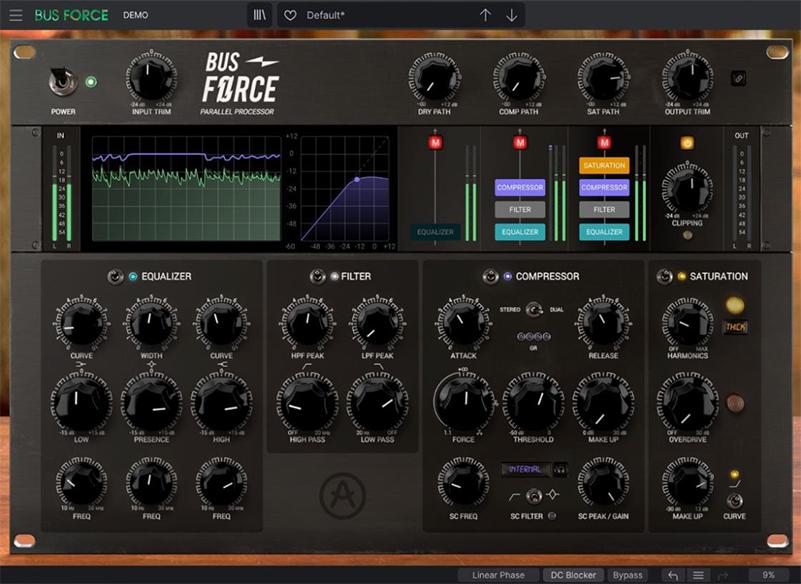
4. Bus FORCE from Arturia
Arturia Bus FORCE is a feature-rich mastering processor that recreates the atmosphere and features of traditional analog hardware. This plugin enriches the sound of your tracks, adding a touch of warmth and personality with its unique feature set, including harmonic generation, compression, EQ and saturation, making your tracks sound rich and refined.
Three key processing steps in Bus FORCE:
Harmonics: enriching the sound of the track with additional nuances;
Dynamics: fine-tuning the volume level and dynamic range;
Equalizer: balances the frequency spectrum for ideal sound.
These components work synergistically to achieve the effect of classic analog mastering, providing ample opportunity to fine-tune the sound and create a vintage feel.
Bus FORCE’s saturation circuitry offers three different analog warmth options, allowing you to experiment with different types of saturation to add delicate depth and harmonic variety to your mix, enhancing its analog qualities.
Main characteristics of Bus FORCE:
Three stages of processing: harmonics, dynamics and equalizer for full mastering;
Saturation Circuit: Select from three types of analog warmth for sonic variety;
Parallel processing: convenient mixing of processed and original signals;
Level adjustment: Precisely matches input and output signals for perfect balance.
Using a saturation circuit, consider automating the type and intensity of saturation over the course of a track. For example, soft tape saturation can be applied in verses, while more intense tube saturation can be used in choruses to add emotional richness and dynamics. This approach will allow you to create captivating master recordings that will keep the listener interested throughout the entire piece.
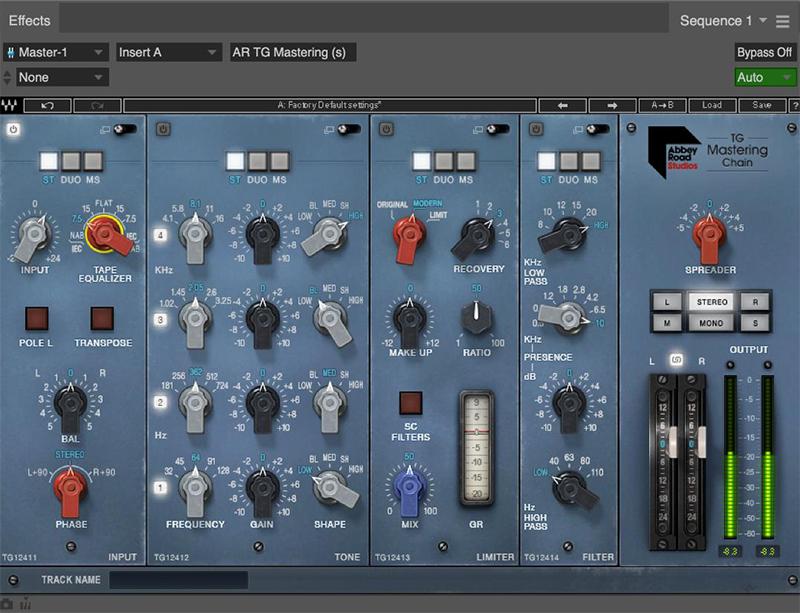
5. Waves Audio Abbey Road TG Mastering Chain
The Abbey Road TG Mastering Chain plugin from Waves Audio is a carefully modeled emulation of the iconic EMI TG12410 mastering console used at Abbey Road Studios. This plugin brings the classic character and warmth of vintage analog mastering into your digital world, allowing you to add that coveted analog magic to your tracks.
One of the outstanding features of the Abbey Road TG mastering chain is its modular design, which allows different processing components to be combined to create the perfect mastering chain. This flexibility allows you to experiment with different combinations of EQ, compression and limiting to find the perfect sound for your music.
Another notable aspect of this plugin is its mid-side processing capabilities. This allows the center and side channels of your mix to be processed independently, providing more precise control over the stereo image and overall tonal balance.
Key Features:
Modular design for flexible configuration of the mastering chain;
Mid-side processing for improved stereo control;
Authentic emulation of the iconic EMI TG12410 mastering console;
Input and output gain controls for precise level matching.
To create a sense of depth in your master, try using mid-side processing to subtly enhance the atmosphere of the mix. You can apply a slight high-frequency EQ boost to the side channel to emphasize the spatial elements of the mix, such as reverb and delay. This will create a more immersive listening experience and immerse your audience in the soundscape of your music.
6. Eventide Elevate
Eventide Elevate’s mastering suite, the Elevate Mastering Bundle, is a comprehensive solution for those who want professional-sounding tracks. Including powerful equalization, compression and limiting tools, this package provides a full range of tools for enhancing your musical productions.
The standout element of this set is the Elevate Multi-Band Limiter, which, thanks to an advanced algorithm, automatically adjusts the gain and release parameters, allowing you to achieve high volumes without losing quality. Its multi-band structure allows for detailed control of dynamics, creating a perfectly balanced master.
EQuivocate, a graphic equalizer with a set of frequencies based on the Mel scale, is also part of this package. This scale, which corresponds to the human perception of sound, makes the EQ adjustment process more intuitive and musical.
Punctuate, the included transient shaper, helps add extra energy and clarity to the sound by allowing you to fine-tune the attack and sustain of sounds, resulting in a dynamic and exciting master.
Main advantages:
Elevate Multi-Band Limiter: for unparalleled gain purity;
EQuivocate graphic equalizer: with settings based on the Chalk scale for precise correction;
Transient shaper Punctuate: to improve detail and sound development;
Comprehensive mastering tools: for exceptional sound.
With EQuivocate, don’t miss out on the ability to use Match EQ to analyze and apply the frequency balance of reference tracks to your mix, allowing you to achieve the sound you want and have confidence in its quality on any audio system and in any genre.
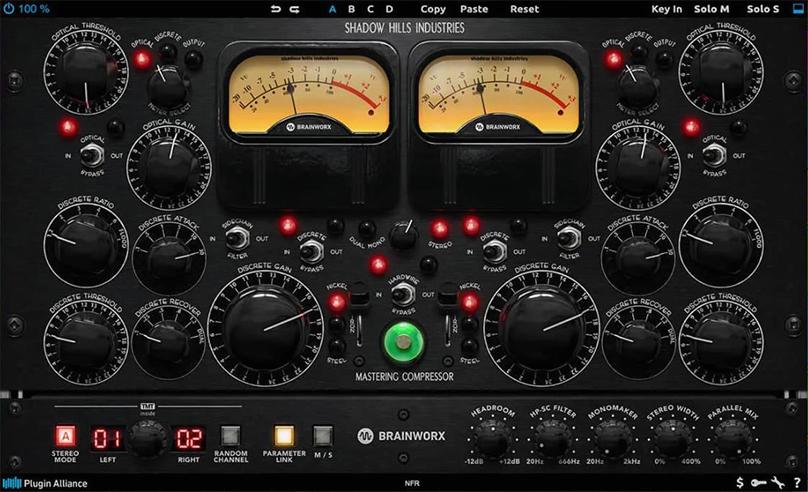
8. Shadow Hills Mastering Compressor
If you’re looking for a compressor that will bring a unique and iconic character to your music, look no further than the Shadow Hills Mastering Compressor. This popular plugin is modeled after renowned hardware and offers the same incredible sound quality and flexibility as its analog counterpart.
The Shadow Hills Mastering Compressor excels in its versatility, offering two-stage compression with separate controls for each stage. This design allows you to fine-tune the compression characteristics to achieve the perfect balance between transparency and musicality.
With three selectable transformer circuits (nickel, iron, and steel), this VST mastering plugin offers a wide range of tonal possibilities, making it suitable for virtually any genre.
Main characteristics:
Optical and discrete VCA compression stages for versatile and transparent dynamic control;
Three selectable transformer circuits for unique tonal color;
Sidechain high-pass filter to prevent excessive compression of low frequencies;
Parallel compression capabilities for mixing dry and compressed signals;
Flexible measurement options including input, output and gain reduction meters.
For added control, try using the external sidechain feature in Shadow Hills Mastering Compressor. By connecting another audio source, such as a reference track or rhythm element from your mix, to the sidechain input, you can control the behavior of the compressor based on the external signal. This technique allows you to create interesting and dynamic interactions between the different elements of your mix, resulting in a more engaging and professional sound.
Author
Antony Tornver
Published
May 30, 2024
mixing & mastering
VST plugins
DAW techniques
Make Music Now.
No Downloads, Just
Your Browser.
Start creating beats and songs in minutes. No experience needed — it's that easy.