Online piano

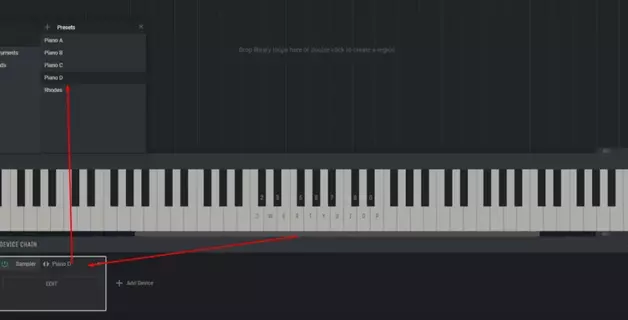
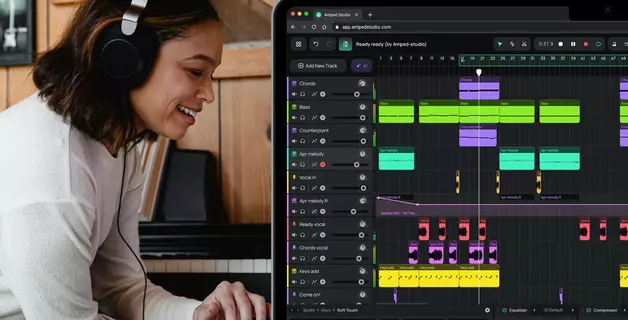
If you don’t have access to a real piano but want to try your hand at creating melodies, learning chords, or simply exploring your musical creativity, online tools can help bring your ideas to life. They offer an accessible way to learn musical basics and experiment with arrangements—without the need for expensive gear. One such solution is Amped Studio, a platform that offers not only a virtual piano but a complete music production environment right in your browser.
Some standout features of Amped Studio:
- A digital audio workstation in your browser. Amped Studio is a fully featured digital audio workstation (DAW) that works directly in your browser. No software installation is required. You can record vocals, create melodies, work with and edit audio files, and save everything to the cloud. This is especially convenient, as all your projects are stored securely online — no need to worry about losing data or filling up your hard drive.
- VST Plugin Support. Amped Studio is the first online studio to support VST virtual instruments and effects. This powerful feature lets you use professional synthesizers and audio processors typically reserved for desktop software, opening up possibilities for complex arrangements and detailed sound design.
Amped Studio lets you play a virtual piano in your browser using either your computer keyboard or mouse. It’s ideal for learning chords, composing melodies, building arrangements, or capturing musical ideas on the fly — no equipment needed.
Device Compatibility
Amped Studio’s virtual piano runs in your browser and is compatible with most desktop and laptop devices, regardless of operating system. Whether you're using macOS, Windows, or Linux, you can launch the studio in Chrome, Firefox, Opera, or any other modern browser. Mobile support is currently limited, so for the best experience, use a non-mobile device.
You can play using your computer keyboard — each key corresponds to a note — or click directly on the virtual keys using your mouse, which is especially helpful for beginners just getting familiar with the layout.
Capture Musical Ideas Anytime with a Virtual Piano
Musical inspiration can strike when you least expect it — and having a virtual piano at your fingertips helps you catch those ideas before they fade.
Imagine you're on the bus, and a melody comes to mind. Just connect your headphones, open Amped Studio in your mobile browser, and play it out using the virtual keyboard. You can save the sequence and refine it later in the editor.
Or maybe you're sitting in a monotonous lecture when a catchy hook pops into your head. With a tablet, you can quickly test and capture your idea without needing a full music setup.
Even in the office — say you’re working on reports and suddenly think of an original chord progression. You likely won’t have a piano nearby, but you can open Amped Studio on your desktop, hear the chords, and save your progress right away.
What Can a Digital Piano Do?
A browser-based digital piano lets you create and edit music without needing a physical instrument. It supports polyphony, so you can play chords or melodies with multiple notes. A built-in metronome helps you keep time, and sound customization options let you shape the tone to fit your music.
Here’s what you can do with it:
- Play with different instrument sounds — switch between piano, organ, guitar, violin, and more to hear your melody in various styles.
- Add audio effects — change the vibe of your composition with effects like reverb or delay.
- Connect a MIDI keyboard — for those who want more tactile control and precision.
- Record and edit — save your melodies, tweak them later, or share them with collaborators.
Using an external MIDI controller with the virtual piano gives you real-time control, making it easier to test arrangements, work in different octaves, or switch instruments on the fly.
Collaborating with others? You can record an idea, make quick edits, and share it instantly — no waiting around or losing creative momentum.
Amped Studio’s interface is beginner-friendly. Keys are labeled clearly, so even if you’ve never used a piano before, you can start experimenting in minutes.
A Beginner-Friendly Way to Start Playing
Never touched a real piano before? That’s totally fine. The online keyboard is a great starting point for anyone curious about music. There’s no need to read sheet music or know hand positions. Simply press the on-screen keys or use your computer keyboard.
With a little time, you'll recognize note placements and basic chords. And if you’re using a touchscreen tablet, playing feels even more intuitive — just tap and go.
Why Musicians Love Virtual Pianos
Creative sparks don’t wait for setup time. Searching for plugins, opening software, or setting up gear can interrupt your flow. Amped Studio skips all that. You can bookmark the virtual piano and be ready to play in seconds.
Whether you're a producer, songwriter, or hobbyist, this tool is perfect for catching ideas before they’re gone. And since it works online, you can use it anywhere — in the studio, on the go, or late at night when inspiration strikes.
Beyond Just Playing: What Else You Can Do
Amped Studio is more than a piano — it's a full creative platform for learning, composing, and having fun.
Build Full Tracks
Start with a simple melody and grow it into a full song. Add beats, basslines, synth layers, or even vocals. Amped Studio’s sound library includes everything from classical strings to futuristic synths, so you can shape any musical idea into a complete arrangement.
Explore and Improvise
Use the piano to jam freely or try new styles. Have fun testing out sounds, layering loops, or even starting a music battle with friends.
Learn Music Theory
Studying chords, scales, or modes? Try them in real time. Amped Studio helps turn music theory from abstract concept into hands-on learning.
Amped Studio makes music accessible — whether you’re learning, composing, or just goofing around. Jump in and see how easy it is to create music anytime, anywhere.