What's New in Amped Studio: Super Presets and A Redesigned Interface

Amped Studio has received its biggest update yet — a complete visual and functional overhaul of the interface alongside a major new feature called Super Presets. The redesign touches nearly every part of the online music production software, from track headers and editors to menus and navigation. Whether you use Amped Studio to make music online occasionally or work in it daily, the updated studio is faster to navigate and easier to read.
In this article:
Super Presets — complete instrument and effect chains in one click
A redesigned interface with integrated mixing controls, improved editors, and a streamlined menu
Want to explore the update yourself? Open the studio. For a walkthrough of what changed, read on.
Super Presets: Complete Sounds in One Click
Getting from an empty track to a sound you can actually work with usually means choosing an instrument, adding effects, and adjusting parameters one by one. Super Presets bundle all of that into a single preset that loads in one click and is immediately playable — instrument, EQ, reverb, compression, whatever the sound calls for, already configured and ready to go.
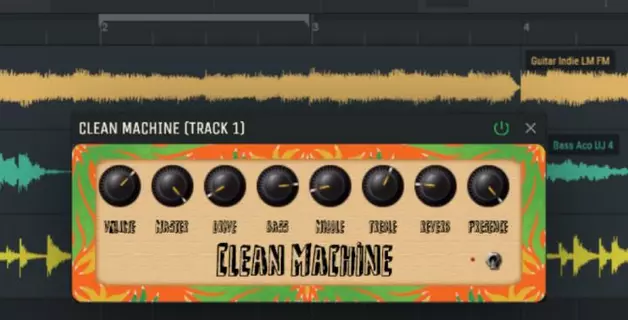
What makes Super Presets more than just a preset library is the unified control panel. Each preset surfaces five to eight synth controls — the specific parameters that have the most impact on that particular sound. The Reverb knob adjusts the reverb mix, Brightness adjusts the filter cutoff, and so on. Every knob maps to exactly one parameter, so you always know what you are changing. You get the speed of a preset with the flexibility of easy sound editing — shape the sound to fit your track without opening a single plugin window. And when you want to go deeper, you can unfold any Super Preset to see and edit the full device chain — every instrument setting and effect parameter is accessible.
This means you can load a pad preset, immediately start playing chords to see if the idea works, adjust the reverb and brightness to taste, and move on — all within a minute. If the sound is close but needs more detailed work, unfold the chain and fine-tune individual effects at your own pace. The creative decision comes first, the technical refinement follows when you are ready for it.

Finding Sounds With the New Preset Browser
Super Presets are organized in a new three-column browser. The first column sorts by instrument type — Synth, Bass, Piano, Drums, Horns, Guitars. The second column shows subcategories (Lead, Pad, Keys, Bells, Pluck under Synth, for example). The third column lists individual presets with descriptive names that hint at their character.

This category-first approach means you start from the role a sound needs to fill in your track rather than scrolling through a flat list. Need a bass sound? Open the Bass category, choose between Bass Guitar and Synth Bass, and audition presets immediately.
The browser also distinguishes between free and premium presets. A diamond icon indicates that a preset uses premium-tier instruments or effects. Presets without the icon are available on the free plan.
For a complete walkthrough of how Super Presets work — including how to unfold the effect chain to inspect and modify individual devices — see our dedicated Super Presets guide.
A Modern Interface Built for Faster Production
The update redesigns nearly every panel in the studio. Tracks, editors, menus, and controls all received a visual refresh — cleaner typography, better contrast, more consistent spacing. But the changes are not purely cosmetic. Several interface elements now do more than they did before, which means fewer clicks and less switching between views while you work.
Improved MIDI and Audio Editing
The Note Editor and Audio Editor both received a visual overhaul that makes them quicker to navigate. Panels are decluttered — the most frequently used tools are surfaced as clearly labeled controls, while less immediate functions remain accessible through the context menu. Clip and waveform colors now match your track header accent color across the arrangement view and the editors, so in a busy project with a dozen tracks you can always tell at a glance which track you are working in.

The Note Editor is Amped Studio's piano roll editor and MIDI sequencer — this is where you write melodies and chords, program drum patterns, and arrange parts by editing MIDI notes on a grid. The Audio Editor is where you work with recordings and samples: trim audio clips, split them into individual slices, adjust pitch and gain, and shape audio before it hits the mix. In practice, most projects involve moving between the two constantly — you lay down a chord progression in the MIDI editor online, then switch to the Audio Editor to cut the silence before a vocal entry or trim a sample to fit the bar. The redesigned editors share the same visual language, and the cleaner layout means removing friction between you and the actual notes or audio you are working with.

Redesigned Main Menu
The studio's main menu has been reorganized into a clear, single-panel layout. New Project, Open Project, Save Project As, Import File, Export File, and Share Project are now accessible from one place, along with quick access to AI tools. It is a small change in structure, but it removes a few extra steps from routine project management — especially exporting and sharing, which are things you do with every finished track.
Track Headers With Built-In Mixing Controls
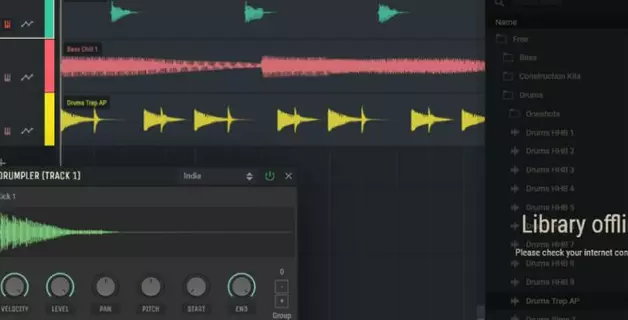
Track headers — the side panels next to each track in the arrangement — now include level meters and a pan knob directly in the header itself. Previously, adjusting volume control or track panning for individual tracks meant opening the instrument panel. Now you can balance levels and position sounds in the stereo field while staying in the arrangement.

This is especially useful during the arranging stage, when you are still deciding which elements need more or less space in the mix. You can now handle mixing tracks directly in the arrangement without interrupting your flow. For more detailed mixing, the full mixer is still there. But for quick decisions about balance and stereo placement, the track headers now handle it.
Try the Updated Studio
This update brings Amped Studio closer to what the best online DAW should feel like — fast to navigate, clear to read, and designed so that common tasks take fewer steps. The interface improvements make the online MIDI editor and mixing workflow more immediate, while Super Presets give you production-ready sounds without the setup time.
All of these updates are available now. Open the studio in your browser to see the changes for yourself — no downloads, no installation. If you are ready to start making beats with the new tools, every feature described above is live in your workspace.
FAQ
The update includes a complete visual redesign of the interface, integrated level meters and pan controls in track headers, improved MIDI Note Editor and Audio Editor, a reorganized main menu, and a new feature called Super Presets that loads complete instrument and effect chains in one click.
Yes. The interface improvements, updated editors, and track header controls are available to all users. Super Presets include both free and premium options — presets marked with a diamond icon require a Premium subscription.
No. Amped Studio runs entirely in your browser with no downloads or plugins required. The update is already live — open the studio and you will see the new interface and features immediately. Works on any device with a modern browser.
Yes. Open any existing project, add a new track or change the instrument on an existing one, and you can load any Super Preset. Your existing tracks, effects, and settings remain completely unchanged.
A piano roll editor is a visual interface for writing and editing MIDI music. Notes appear as blocks on a grid — horizontal position controls timing, vertical position controls pitch, and block length controls duration. In Amped Studio, the Note Editor is the piano roll where you compose melodies, chords, and drum patterns.
Yes. Amped Studio's Note Editor lets you create and edit MIDI directly in your browser at no cost. Free-tier users have full access to the MIDI editor, audio editor, and core instruments. Premium subscriptions add additional instruments, effects, and User Library items.