AI Assistant: Amped Studio's Multitrack AI Music Generator Explained


AI music generators in 2025 fall into two categories: prompt-based tools that create finished songs from text descriptions, and multitrack generators that produce editable AI stems for further production. Amped Studio's AI Assistant takes the second approach — you select a genre preset, and the AI stem generator creates 5-9 separate instrument tracks that load directly into a browser-based DAW for immediate editing. This positions it as a practical AI music generator free option for producers who need full creative control.
This matters for producers who need control over individual elements. Most AI song generators output a single audio file, requiring external stem separation tools if you want to adjust drum levels, isolate vocals, or replace a bassline. These tools introduce audio artifacts and quality degradation — a fundamental limitation of reverse-engineering a finished mix. Amped Studio generates editable AI stems preserving full audio fidelity since each instrument is created separately from the start. Among best AI music generator options for multitrack production, this native stem approach eliminates the quality compromises inherent to the post-generation separation.

How to Use the AI Assistant
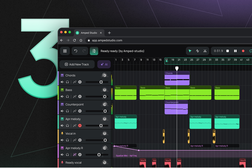
The AI Assistant uses a genre-first approach rather than text prompts, functioning as an AI music generator online that requires no software installation. Open Amped Studio in your browser , click the purple “Start Project with AI” under the AI tools welcome screen bar, then configure three parameters: genre, tempo (BPM), and length (up to 240 seconds). Click "Generate" and wait 15-30 seconds while the AI music creator builds a complete multitrack project.
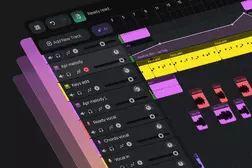
The exact types of instrument tracks generated will depend on your genre selection. Electronic styles like Techno might generate 9 separate stems: Kick, Snare, Hi-Hat, Percussion, Bass, Lead, Chords, Riser, and FX. Ambient productions focus on harmonic layers with multiple Chord tracks and atmospheric textures (5-6 tracks total). Trap emphasizes rhythm elements — Percussion, Bass, Lead, Riser, FX — without explicit kick/snare separation, matching the genre's production conventions.
The AI Assistant (effectively acting as an AI stem generator) creates each instrument separately, so every track arrives as a clean, editable audio region. Each stem is a standard audio region, meaning you can apply the same editing techniques you'd use with any audio-based project: delete unwanted instruments, adjust volumes, add audio effects, etc. You are also free to transform the initial state of the project to your liking by adding additional MIDI tracks, recording your vocals over the backing, copy-pasting sections to extend beyond the 240-second generation limit and executing any other song arrangement steps.
Understanding Genre Presets and Output
Amped Studio's AI Assistant offers 12 genre presets covering electronic, urban, and cinematic styles:
Electronic:
- Ambient
- Drum 'n' Bass
- Dubstep
- Electronica
- House
- Techno
Urban:
- Afro Amapiano
- Drill
- Lo-Fi Hip Hop
- Trap
Production Music:
- Cinematic
- Corporate
Each genre uses tailored instrument combinations and arrangement patterns. Lo-Fi Hip Hop generations typically include laid-back drums, jazzy chords, and warm bass, while Drill productions emphasize aggressive 808 bass patterns and hi-hat rolls. The AI beat maker functionality within Trap and Drill presets creates rhythm-forward arrangements that match contemporary urban production standards. Corporate presets generate motivational chord progressions and uplifting melodies suitable for background music.
When you work with genre presets instead of prompt-based tools, you're accepting narrower creative input in exchange for consistent, genre-appropriate results — no unexpected surprises, but also no wild creative tangents. This makes the AI Assistant function effectively as an AI song starter, providing production-ready foundations you can build upon.
Editing Your Generated Tracks
Once your AI-generated project loads, you have full production capabilities:
Remove unwanted elements: Delete instrument tracks that don't fit your vision. If the AI-generated FX track feels too busy or the Riser doesn't match your arrangement, simply remove them from the timeline.
Add processing effects: Insert EQ to shape frequency balance, add reverb for spatial depth, apply compression to control dynamics, or use distortion for character. Each stem accepts Amped Studio's built-in effects chain.
Layer additional instruments: Add MIDI tracks using Amped Studio's synthesizers, import your own samples from the sound library, or drag in audio loops. The AI-generated stems serve as a foundation for further composition.
Record live performances: Use the audio recording feature to capture vocals, guitar, or other instruments over the AI-generated backing tracks. This workflow suits songwriters who need professional-quality instrumental beds without hiring session musicians.
Extend song duration: Copy-paste generated sections to build full song arrangements. The 240-second generation limit applies per generation, but you can duplicate sections to create 3-4 minute songs with intro, verse, chorus, and outro structures.
Master and export: Apply mastering effects to the master track — EQ, compression, limiting — then export to MP3 or WAV to your computer. Alternatively, save as an Amped Studio project file for future editing sessions.
The editable AI stems approach gives you complete mixing control. Adjust individual instrument volumes without affecting others, apply targeted EQ to fix frequency conflicts, or swap out generated elements with your own sounds. This level of control separates multitrack AI music generators from single-file output tools.
AI Music Generator Comparison
Most AI song generators create a single audio file — perfect for content creators needing background music or songwriters capturing quick demos. If you use basic-tier Suno or Udio and want to isolate vocals, adjust drum levels, or replace specific instruments, you'll need external stem separation tools like RipX, iZotope RX, or LALAL.AI.
These AI-powered separators analyze the finished audio and attempt to isolate individual elements, but the process introduces audible artifacts, phase issues and overall audio quality degradation. The quality loss varies — dry vocals often separate cleanly, but complex mixes with overlapping frequencies and lots of reverb tend to produce muddy, artifact-rich results.
For native AI multitrack generator output without quality compromise, premium options like Suno Studio ($25/month) exist for advanced users. Amped Studio offers multitrack AI generation as an AI music generator free tier option, making it accessible for beginners learning music production or producers exploring AI-assisted workflows.
The key difference: stems are created separately during generation rather than extracted from a finished mix, preserving full audio fidelity for each instrument. This makes Amped Studio's AI Assistant one of the best AI music generator options for producers who need editing flexibility over prompt-based creativity.
Pricing and Access
Amped Studio offers three subscription tiers:
Free: AI music generation once per 24 hours with multitrack stems, access to 400+ built-in audio/MIDI files with no storage for files you import or record, core DAW instruments and effects
Premium ($5.99/month or $69.99/year): AI generation once per 24 hours, 10GB storage for imported or recorded audio, additional premium instruments and effects, premium sound library access, WAV export, VST3 plugin support
Premium + AI ($9.99/month or $119.99/year): Unlimited AI generation with no wait time between generations, 50GB storage for imported or recorded audio, full premium instrument and effects library, VST3 plugin support
For occasional AI music generator free experimentation or learning purposes, the free tier provides multitrack generation. Producers building multiple projects weekly or working on client deadlines benefit from Premium + AI's on-demand generation capability. View full pricing comparison at https://my.ampedstudio.com/pricing.
Who Benefits from This Workflow
Beginner producers learning arrangement and mixing benefit from studying professionally structured multitrack projects. Examine how drums, bass, and chords interact, then experiment with processing techniques on individual stems without destroying the original generation. The AI music creator handles composition complexity while you focus on developing mixing skills.
Songwriters and vocalists who need instrumental backing tracks can generate genre-appropriate beds in seconds, then focus creative energy on topline melodies and lyrics rather than production technicalities. Use the AI Assistant as an AI song starter to overcome writer's block or explore new genre directions.
Content creators producing videos, podcasts, or games benefit from royalty-free backing music with full editing control. Adjust the mix to fit voiceovers, extend sections to match video length, or remove instruments that clash with dialogue frequencies.
Electronic music producers use AI generations as creative starting points — generate a Techno project, keep the drum patterns and bassline, replace the melody with custom synthesizers, add vocal samples, then arrange into a full track. This workflow accelerates the initial composition phase while maintaining creative control over the final production. When using the AI Assistant as an AI beat maker for rhythm-heavy genres, the generated drum patterns and bass foundations provide solid starting points you can build entire productions around."
Key Takeaways
Ready to explore multitrack AI music generation? Create your free Amped Studio account and generate your first AI-powered project. Select from 12 genre presets spanning Ambient, Techno, Trap, Lo-Fi Hip Hop, and more, then edit the generated editable AI stems using the built-in browser DAW. No downloads, no installations — just open your browser and start creating with this AI music generator online tool.
FAQ
An AI music generator uses artificial intelligence algorithms to create original music compositions automatically. Most tools fall into two categories: prompt-based generators that create finished songs from text descriptions, and multitrack generators that produce separate editable AI stems. Amped Studio uses the second approach, generating 5-9 individual tracks (drums, bass, chords, fx, etc) that load into a DAW for editing.
Yes, but the editing capability depends on the output format. AI generators that produce single audio files require external AI stem separator tools to isolate individual instruments, which introduces quality loss. Multitrack AI music generators like Amped Studio create separate instrument stems from the start, allowing full editing control without quality degradation — adjust volumes, add effects, replace instruments, or record additional parts.
AI music generators typically use machine learning models trained on large datasets of existing music. When you select parameters like genre, tempo, and duration, the AI analyzes patterns from similar compositions and generates new audio that matches those stylistic characteristics. Amped Studio's AI Assistant creates individual instrument parts (kick, bass, chords, etc.) separately as editable AI stems, then combines them into a cohesive multitrack arrangement.
AI-generated music from Amped Studio is royalty-free for commercial use, meaning you can use the generated tracks in videos, podcasts, games, or other projects without additional licensing fees. Keep in mind that purely AI-generated content may not be eligible for copyright protection under U.S. law unless you add substantial human creative input through editing, arrangement, or recording.
Traditional DAWs (Digital Audio Workstations) provide tools for recording, editing, and mixing music but don't create compositions automatically. AI music generators create original compositions but may not include editing capabilities. Amped Studio combines both — the AI Assistant generates multitrack projects as an AI multitrack generator, and the integrated DAW provides tools for editing, mixing, and exporting the results.
Yes, Amped Studio offers AI music generation on its free tier, making it accessible as an AI music generator free option. The free plan includes multitrack stem generation, 300 MB cloud storage, and core DAW features. Premium tiers ($5.99-$9.99/month) add unlimited generation, cloud storage, additional instruments, effects and library assets for professional workflows.