Super Presets: Ready-to-Use Instrument and Effect Chains

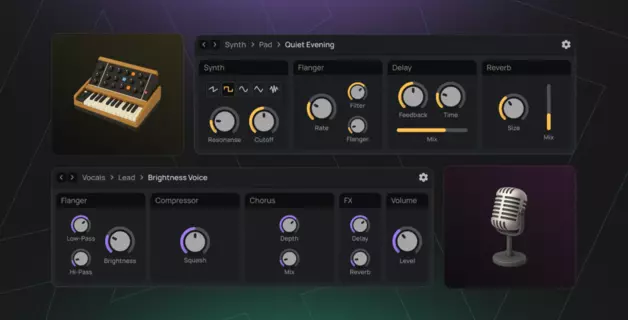
Super Presets in Amped Studio combine a virtual instrument with its complete effect chain in one loadable preset. Each Super Preset loads a complete signal path – from synthesizer or drum machine through EQ, reverb, compression, and other effects – in a single click. Rather than building effect chains manually, you get production-ready sounds curated by professional sound designers.
This two-layer system offers both simplicity and depth. A streamlined control panel with 5-8 essential knobs lets you shape sounds expressively without technical knowledge. When you want to understand how the sound works, unfold the preset to see the complete device chain and adjust individual parameters.
Amped Studio currently offers over 80 expertly curated Super Presets across 8 instrument categories, with more added regularly.
In this guide, you'll learn:
- How to access and load Super Presets in your projects
- How to use the Super Presets panel for quick sound shaping
- How toaccess the complete effect chain
- Why Super Presets improve music production workflow
- How to find the right Super Preset for your track
How to Access Super Presets in Your Project
Super Presets are accessible immediately when you start working in Amped Studio. The browser interface organizes all available sounds by instrument category.
Loading a Super Preset
On your track interface, click the "Select Super Preset" button to open the browser. This displays the complete library organized in a three-column layout. Whether you're beginning a new song recording or adding elements to an existing arrangement, Super Presets integrate seamlessly.

Browser Navigation
The Super Preset browser presents three columns. Column 1 shows main categories: Synth, Bass, Piano, Drums, Orchestral, and Guitars. These organize presets by instrument type rather than genre, encouraging creative experimentation.
Column 2 displays subcategories. For example, Synth includes Lead, Pad, Keys, Bells, and Pluck. Bass divides into Bass Guitar and Synth Bass options.
Column 3 lists individual presets with descriptive names like "Liquid Buzz," "Vintage Drift," or "Deep Chime" that hint at their sonic character.Naigate through categories to find sounds quickly.

Free vs Premium Super Presets
Some preset names display a diamond icon. This indicates the preset requires a Premium or Premium+AI subscription because it uses premium-tier instruments or effects. Presets without the diamond are accessible on the free tier.
The diamond appears based purely on which devices build the preset, not on sound quality. Free and Premium presets receive identical curation attention.
Click any preset name to load it instantly. The complete instrument and effect chain loads together, ready for you to start playing.
Using Super Presets Controls for Sound Shaping
Each Super Preset features a control panel with typically 5-8 knobs or sliders. These performance controls provide direct access to the most impactful parameters from the device chain.
How Controls Work
Each control corresponds to one specific parameter from a device in the signal chain. When you adjust "Reverb," you're controlling the reverb device's mix amount. "Attack" adjusts the synthesizer's envelope attack time. "Brightness" typically maps to a synthesizer filter making the sound brighter or duller.
This direct one-to-one mapping makes controls predictable and easy to understand. Each knob has a clear, specific function.

Our sound designers have identified which 5-8 parameters have the biggest impact on each sound. You don't need to know which of a synthesizer's 50+ parameters matter most - the essential controls are already presented on the effects control panel.
Exploring the Complete Effect Chain
While the control panel handles quick sound shaping, Super Presets also let you view and modify the complete signal chain. This transparency turns presets into learning tools.
Unfolding the Chain
Click the Gear Icon in the top right corner of the panel. This reveals the horizontal chain of all devices – the complete signal path from instrument through each effect in order.

The unfolded view displays each device with its full parameter interface. A typical preset might show: Synthesizer → Equalizer → Distortion → Reverb, with each device's controls visible.
Modifying the Chain
You have full access to adjust individual parameters on each device. The synthesizer's filter settings, the compressor's threshold, the reverb's decay time - every parameter responds to your adjustments.
You cannot currently add or remove devices within the Super Preset itself, or reorder effects within it. However, you can always add additional effects after the Super Preset in your track's signal chain.
How Super Presets Speed Up Music Production
Creating a polished sound involves multiple steps. You load a synthesizer and configure its oscillators, filters, and envelopes. Then you add effects – such as equalizers, compressors, reverb, delay. Each effect needs parameter adjustments. This process can traditionally be rather lengthy and break your flow or distract from the initial idea or inspiration.
With Amped Studio’s Super Presets one click loads the complete sound – instrument, effects rack, and optimized settings configured together. Your chosen preset is immediately playable with its characteristic processing in place.
Super Presets help improve your music production efficiency by letting you focus on creative decisions removing the friction of excessive sound design decision steps in every single project.
Quick Track Setup with Default Super Presets
When you add a new MIDI track, you select which instrument category you need - Bass, Drums, Synth, Piano, or others. Clicking a category instantly adds a track with a default Super Preset from that category already loaded. You can start playing immediately, then adjust the Super Preset's controls or switch to a different Super Preset if needed. This streamlines the initial setup, getting you from empty project to playable sounds in seconds.
Instant Playability for Fast Sketching
Super Presets provide instant playability when sketching musical ideas. Load a preset and start playing or even recording immediately. The sound is production-quality, so you evaluate your musical idea rather than wondering if different processing would help.
Curated Selection
This curation eliminates decision paralysis. When you load "Vintage Drift" from the Synth Pad category, you immediately see 7 controls organized into logical groups: Voice (Brightness, Width), Vibrato (Amount, Speed), Hi-Pass (Frequency), and Reverb. These controls give you comprehensive sound shaping power - adjusting tonal character, stereo width, movement, filtering, and space - without scrolling through dozens of parameters across multiple device windows wondering which to adjust.
Intuitive Naming
Control names reflect the character change you'll hear rather than technical terminology. "Brightness" communicates more immediately than "Filter Cutoff Frequency." "Slur" describes the wavering effect sound more immediately and less confusingly than "LFO Rate." We approached this with beginner users in mind looking for optimal workflow without diving straight into deep technical jargon.
Learning Through Example
Unfold presets to see how our team of experts structured the signal chain in their curated Super Presets. Which effects do they place before or after others? What settings create space without muddying the mix?
Super Presets particularly help you understand layered sounds - how to combine sonic elements into cohesive textures. Load a pad preset and unfold it to see how stereo widening, filtered reverb, and strategic EQ combine to create depth without muddiness. This approach helps whether you're just learning how to make beats or refining advanced sound synthesis and processing techniques.
A perect learning opportunity: unfold the the Super Preset control panel and inspect all constituent devices and their settings to see exactly how professional sound processing is structured, from device order to parameter values.
Super Presets vs. Effect Racks in Other DAWs
Many DAWs have similar functionality that may have some key differences. Those similar tools have different names: macro controls, smart controls, instrument racks or effects racks, or channel strips for combining devices. While essentially sharing much of the functionality, there are some key differences between those alternatives and our Super Presets.
Let's make an important distinction: Super Presets are not the same as macro controls. The latter will typically control multiple parameters within corresponding synthesizers or effects, which has both pros and cons. While providing powerful capabilities for advanced users, this power comes with complexity.
Super Presets take a more straightforward approach. Each control corresponds to one specific parameter. When you adjust "Reverb," you're controlling exactly that - the reverb mix parameter.
This direct relationship makes controls predictable without the need to reach for documentation. Our sound designers have identified which specific parameters have the most musical impact and surfaced exactly those controls for immediate access.
Finding the Right Super Preset
With currently over 100 curated presets organized across 8 categories, having search strategies helps you find appropriate sounds efficiently.
Browsing by Instrument Type
The category system organizes presets by their primary instrument rather than genre. This encourages creative cross-pollination.
Need low-end foundation? Navigate to Bass, then choose between Bass Guitar for organic tones or Synth Bass for electronic character. Building atmospheric layers? Synth → Pad provides textural options. Creating a lead melody? Synth → Lead offers cutting sounds. The Synth category contains the largest variety of synth presets, from aggressive leads to lush pads, giving you extensive tonal options.
Piano, Drums, Orchestral, Guitars, Pluck, and Bells categories each serve specific instrumental roles while remaining genre-agnostic.
Understanding Preset Names
Preset names provide hints about sonic character or known genre conventions. Warm, vintage presets use names like "Vintage Drift" or "Analog Pad." Bright, modern sounds appear as "Liquid Buzz" or "High Beam." “Acid Bass” refers to the squelchy 303-like tones and “Eight Oh Eight” gives you that bass.
Using Presets as Starting Points
You don't need a perfect match and by all means feel free to experiment with e.g. trying a bass Super Preset for your solo. We chose the most impactful parameters of the sound for you to control on the Super Preset panel, so that you can experiment and find your own perfect variation of the Super Preset setting. A curated Super Preset gives you a professional foundation, but it’s your adjustments make it specifically yours.
Start Creating with Super Presets
Super Presets in Amped Studio combine instruments and effects into ready-to-use sounds that speed up music production. Over 80 expertly curated presets provide immediate access to production-quality tones without configuration time.
The control panels provide essential parameters for quick shaping, while the ability to unfold and examine complete signal chains makes Super Presets valuable learning tools. Cloud-based access means your library is available from any device.
Super Presets load complete instrument and effect chains in one click, saving the time typically required to build processing chains manually. The transparent architecture lets you view every device and parameter, turning presets into educational references for understanding professional sound processing.
Free-tier users access a substantial portion of the library, with Premium subscriptions unlocking the complete collection plus individual access to all underlying instruments and effects.
Open Amped Studio in your browser and explore the Super Presets library to experience how ready-to-use sounds transform your workflow from technical configuration to creative expression.
FAQ
Not currently. Super Presets are curated by Amped Studio's team. User-created Super Presets may be explored in future updates, though there's no confirmed timeline. You can add effects after loading a preset and save those with your project.
Yes. When you adjust controls or modify parameters, those changes save with your project file. The original preset in the library remains unchanged. Each project maintains its own version.
Absolutely. After the Super Preset, you can add any additional effects you want. Think of presets as expertly designed starting points.
Regular instrument presets save only synthesizer settings. Super Presets save the complete package: instrument plus entire effect chain plus relationships between them.
Yes. Amped Studio regularly adds new Super Presets across all categories. New presets appear automatically in your browser.