Vocal recorderBrowserNo download
Online Voice & Vocal Recorder: Record
in Your Browser
Record your voice from your mic in Amped Studio, over a beat or on its own. Shape it with effects and build it into a finished track. No download, no install.


More than a recorder
Record a vocal, then
make it a song
Most online voice recorders end at the download. You record, you save a file, done. Amped Studio records straight into a project, so the take is where the work starts.
Record over a beat. Shape it with effects. Add instruments, mix, and export the finished track, all in your browser.
What’s inside
A vocal recorder with the tools to finish the take

Your mic, your input
Record from a built-in mic or an external USB one. Pick your input device in the settings.

Live monitoring
Hear your vocal through your headphones as you track, so you catch every take right.

Effects on your vocal
Reverb, delay, EQ, compression, and more. All the vocal effects to shape a finished sound.

Vocal VST plugins
Host your own VST3 plugins in the browser and process your vocal your way.

Record to a metronome
Track over a beat and stay in time with the built-in click.

Export your track
Bounce the finished track to MP3, or WAV on a paid plan.
How it works
Record your vocals in four steps

Step 1
Open Amped Studio
Sign in or register, no download, no install. The studio opens in your browser.

Step 2
Set up your mic
Pick your input device and allow mic access when your browser asks. Turn on monitoring to hear yourself as you track.
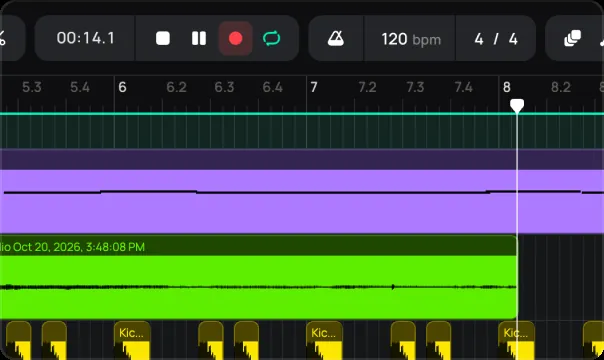
Step 3
Record your take
Track your vocal over a beat or dry, keeping time with the metronome. Record as many takes as you need.

Step 4
Edit, add effects, export
Trim and shape the take, add effects, then export it or build it into your track.
Best for
Who it’s for
Vocalists
Record takes and shape them into a finished vocal
Rappers
Track your verses over a beat, right in the browser
Songwriters
Get an idea down and build the song around it
Producers
Capture vocals and mix them into your project
Content creators
Record a voiceover or a short clip for your video, then export it
Pricing
Record free. Upgrade to keep and export more.
Recording is free. Track your vocal, add effects, and export an MP3 in the same session, no cost. Want to save a project and come back to it, or export in WAV? That comes with a paid plan.
Studio
FREE
For beginner musicians and composers
 Unlimited projects, 16 tracks5 Instruments, 10 FXs0 GB Storage, Export MP3
Premium
$6.99 / mo
For advanced musicians and composers
 Unlimited: projects, tracksUnlock: 9 Instruments, 21 FXs10 GB Storage, Export WAVVST3 Support
Recommended
Pro
$12.99 / mo
Full studio, plus the newest AI models
Unlimited: projects, tracksUnlock: 9 Instruments, 21 FXs50 GB Storage, Export WAVVST3 SupportFAQ
Just getting started? Get clear answers to start creating music online.
How do I record my voice online?
Open Amped Studio, pick your mic, and hit record. Your vocal goes straight into the project, ready to play back, add effects, and build into a track. No download needed.
Is the voice recorder online free?
Yes. You can record, add effects, and export an MP3 in one session at no cost. Saving a project to return to, and WAV export, come with a paid plan.
Can I record vocals over a beat?
Yes. Record against playback and stay in time with the metronome, so you can track verses or a topline right over your beat.
Can I add effects to my vocal?
Yes. Shape your take with reverb, delay, EQ, compression, and more, and host your own VST3 plugins in the browser for full control.
What do I need to record?
A browser and a mic, built-in or external USB. Pick your input in the settings, turn on monitoring, and record.
Do I need to download anything?
No. Amped Studio runs in your browser. Sign in and record, no download, no install.
LET’S TRY
Record your
vocals now.
No Downloads,
Just Your Browser.
A free online DAW that runs in your browser. Produce, record, and mix full tracks in Amped Studio, no download, no install.