Top Panel Explained – Tempo, Playback & Recording
BasicsReading time: 1 min
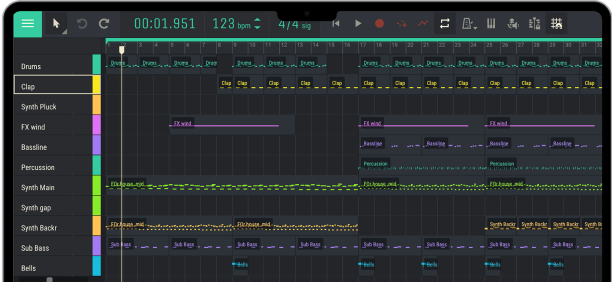
In this tutorial, Andrey explains the Amped Studio top panel and its essential controls. Learn how to set your song tempo and time signature, navigate your project, use the loop function, record MIDI and audio, and work with automation.
00:00 – Introduction to the Top Panel
00:32 – Time Display: Time and Beats
00:56 – Understanding BPM and Song Tempo
01:15 – Changing the Project Tempo
02:01 – Understanding Time Signatures
02:36 – Common Time Signatures: 3/4 and 4/4
03:27 – Play and Stop Controls
03:56 – Using the Spacebar Shortcut
04:22 – Back to Start and Loop Functions
04:48 – Looping a Selected Region
05:17 – Playing Instruments with Your Computer Keyboard
05:46 – Setting Up the Computer Keyboard as a MIDI Keyboard
06:17 – Playing Instruments Without a MIDI Keyboard
06:35 – Recording MIDI and Audio
07:05 – Recording Notes with Your Computer Keyboard
07:30 – Using the Metronome When Recording
08:01 – Re-recording MIDI Notes
08:35 – Note Overdubbing
09:03 – Recording Automation
09:33 – Recording Changes to Instrument Parameters
10:07 – Learning More About Automation
10:34 – Outro
00:00 – Introduction to the Top Panel
00:32 – Time Display: Time and Beats
00:56 – Understanding BPM and Song Tempo
01:15 – Changing the Project Tempo
02:01 – Understanding Time Signatures
02:36 – Common Time Signatures: 3/4 and 4/4
03:27 – Play and Stop Controls
03:56 – Using the Spacebar Shortcut
04:22 – Back to Start and Loop Functions
04:48 – Looping a Selected Region
05:17 – Playing Instruments with Your Computer Keyboard
05:46 – Setting Up the Computer Keyboard as a MIDI Keyboard
06:17 – Playing Instruments Without a MIDI Keyboard
06:35 – Recording MIDI and Audio
07:05 – Recording Notes with Your Computer Keyboard
07:30 – Using the Metronome When Recording
08:01 – Re-recording MIDI Notes
08:35 – Note Overdubbing
09:03 – Recording Automation
09:33 – Recording Changes to Instrument Parameters
10:07 – Learning More About Automation
10:34 – Outro
Tutorial
studio