What Is MIDI and How Does It Work

MIDI is a protocol that tells instruments and software what notes to play, but it does not carry any sound itself. The MIDI meaning is that simple: MIDI handles the instructions (which notes, how hard, how long), and the instrument at the receiving instrument decides what those instructions sound like.
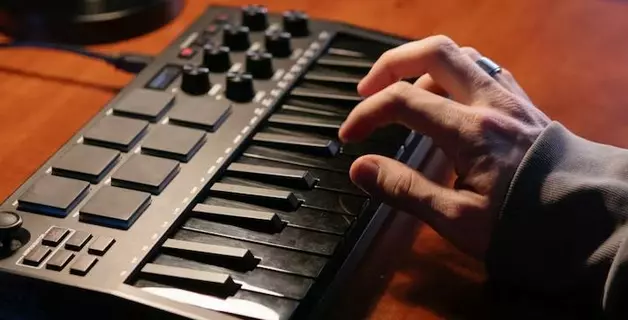
To understand what is MIDI in practice, picture a keyboard plugged into a laptop. You press a key, and the keyboard sends a message containing the note and the velocity. The synth plugin on the laptop receives that message and produces a sound, but load a different plugin, press the same key, and you hear something completely different from the same note data.
Before MIDI, each synthesizer was a standalone instrument. You played it, recorded it, and moved on to the next, the same way a guitarist records a part and then picks up a bass. MIDI turned one person with a keyboard into a conductor with an entire ensemble, sequencing drums, bass, chords, and leads to play their own parts in sync, switching through parts of a song together. Inside a DAW, MIDI is what makes the whole environment function as a production system rather than a collection of separate tools. This article covers MIDI for beginners from the ground up: what the acronym means, how does MIDI work in practice, how it compares to audio, and how you will run into it the moment you start writing notes.
What Does MIDI Stand For
MIDI stands for Musical Instrument Digital Interface. The standard was published in 1983, and it gave electronic musicians what they had been missing: a way to make all your electronic instruments from different manufacturers play together.
Before MIDI, limited forms of sync existed. Roland's DIN Sync protocol could lock a TB-303 bass synth’s tempo to a TR-606 drum machine. Some synthesizers accepted trigger pulses from a drum machine output to step through their internal sequencers. But these partial solutions usually worked between devices from the same manufacturer, and even then you were syncing tempo at best, not exchanging actual note data.
MIDI changed that. A group of competing manufacturers (Roland, Sequential Circuits, Yamaha, Korg, and Kawai among them) agreed on a single universal standard. Any MIDI-equipped device could now send and receive musical data to and from any other, regardless of the brand.
The practical result was immediate. You connect a hardware sequencer to a synthesizer with a MIDI cable. You play a part on the synth while the sequencer records the notes. Hit play and the sequencer sends those notes back to the synth, and the part plays exactly as you performed it. You have just recorded a musical phrase without tape. Connect a second synth to a second MIDI channel, record another part, and now one sequencer is directing two instruments playing different parts in sync. Add a drum machine, and another synthesizer, and a single person with a sequencer and a few cables is conducting an entire arrangement. That idea, revolutionary at the time, is nowadays at the heart of electronic music production and DAWs.
How Does MIDI Work
When you play a note on a instrument with MIDI it sends a MIDI message out of its MIDI port. That message contains the note number (which pitch), the velocity (how hard the key was hit), and the MIDI channel. If another instrument is connected to that port, it receives the same message and plays the note with its own sound engine.
As DAWs became the standard production tool, a new category of hardware emerged: dedicated MIDI controllers (MIDI keyboards, pad controllers, fader units) built specifically to send MIDI signals. Besides note data, MIDI carries other types of information between devices. These are all called MIDI messages:
Note-On / Note-Off tell an instrument to start or stop a pitch.
Velocity (0 to 127) describes how hard a note was played.
CC (Control Change) handles continuous parameters: volume, pan, sustain pedal, modulation, and dozens more.
Pitch Bend smoothly raises or lowers pitch, like bending a guitar string.
Program Change switches the active preset on the receiving instrument.
MIDI vs Audio
Think of MIDI as sheet music. Sheet music tells you what notes to play, how loud, how long, in what order. But sheet music itself makes no sound. Hand the same page to a pianist and a guitarist and you hear two entirely different performances of the same notes. MIDI works the same way: the data is the score, and the instrument reading it determines what you hear.
That presents a much more flexible way of making sound sources do what you want them to. Audio is a recording of a performance: that actual sound, captured as a waveform. You can edit and process that audio file with effects (that is essentially what sampling is), but you cannot reach inside that recording and move one note or swap the instrument after the fact.
That is the core of the audio vs MIDI distinction, and it is one of the first things you run into when you start making music in a DAW. If you want to compose instrument parts and write notes they play (the process that is also sometimes called sequencing), change them later, try different instruments to play them, change the tempo — you work in MIDI.
| Comparison | MIDI | Audio |
|---|---|---|
| What it is | Instructions | Recorded sound waves |
| File Size | ~50 KB for a full song | ~50 MB for a full song (WAV) |
| What you can edit | Notes, their velocity and timing, instrument that plays them. | The audio waveform (by cutting and rearranging). |
| Techniques | Sequencing | Sampling |
Inside a MIDI File
The notes you write in a piano roll are MIDI data. When you save or export them, they are stored as a MIDI file with the .mid extension. A .mid file can hold notes to be played by a single instrument or an entire multi-track arrangement with drums, bass, chords, and melody on separate MIDI tracks.
What a .mid file does not hold is audio. A MIDI format file stores only the instructions, which is why it is so small: a full song might weigh 50 KB as a .mid, compared to 50 MB for the same song recorded as WAV.
Because the file contains only instructions, what it sounds like depends on the instrument that plays it back. The same .mid file opened on two different devices with two different synth engines will sound different. To standardize this, the General MIDI specification assigns fixed preset numbers to common sounds: preset 1 is always a piano, preset 34 always an electric bass, preset 57 always a trumpet. This is what made MIDI ringtones work on early mobile phones and MIDI music work on 1990s websites: the same MIDI file type played recognizably on any compliant device, because every device agreed on which preset number meant which instrument.
Inside a DAW, you rarely handle standalone .mid files. MIDI data lives in clips on tracks, each assigned to a virtual instrument. You can export clips as .mid files to share parts between projects or DAWs, and you can import .mid files from anywhere to edit them in a MIDI editor.
Composing, Arranging, Performing
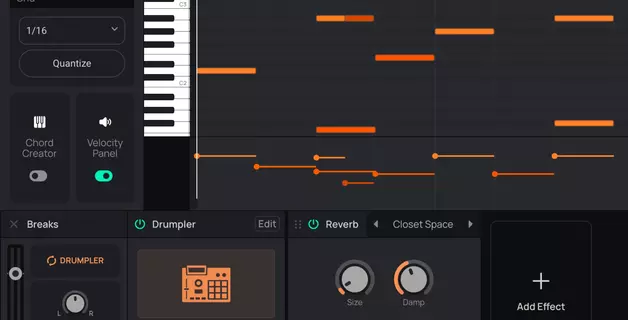
For most people working in a DAW, MIDI comes down to writing notes. You draw squares in a piano roll and drag them around to change pitch and length, and a virtual instrument plays them back. That is the daily reality of music with MIDI. Velocity adds dynamics (how hard each note hits), and quantize tightens your timing when you play parts in from a controller slightly off the beat. If you are recording a solo but cannot nail it cleanly in one pass, you play it close enough and fix the timing afterward, or draw it note by note until it matches what you hear in your head.

The deeper layers of the protocol surface when you need them. If you are running a hardware setup with a DAW sequencing external synths, you are routing MIDI channels and assigning instruments. If you are recording a filter sweep using a modwheel on a hardware synthesizer, you are sending CC messages. But for the majority of music production work, MIDI means entering notes on a piano-roll-style grid.
Where MIDI becomes most visible is in live electronic music and hardware setups. A producer on stage with a laptop or an MPC, a couple of synths, and a drum machine runs the entire rig through MIDI cables. The sequencer sends note patterns to each instrument, and MIDI clock keeps every device locked to the same tempo. In studios that mix both hardware and software, a DAW usually plays the role of the MIDI sequencer orchestrating all the outboard gear and sends note data to external synths over MIDI and records their audio output back.
Getting Started with MIDI
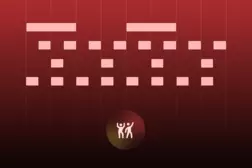
If you are making music in a DAW and you want to write notes, you are already using MIDI. The piano roll is the DAW's MIDI editor: a grid where each row corresponds to a note on a keyboard, and the horizontal axis is time. You click on the grid to place notes, telling the instrument which pitch to play and when. Similar to sheet music, but without the notation symbols you would need to learn to read first. If you can point and click with your mouse, you can write MIDI.
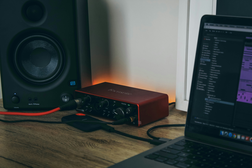
A physical MIDI controller lets you play parts in real time instead of clicking them in with a mouse. USB controllers from Akai, Novation, Arturia, and others plug into your computer with one cable and work with any DAW out of the box. Even a smaller 25-key model can speed up the workflow noticeably, especially if you have basic piano skills.
The MIDI meaning has not changed since 1983: a shared language for musical instructions that keeps your instruments, your software, and your ideas in sync. What has evolved is how little you need to start using it. Amped Studio is a browser-based DAW that runs in a tab with no installation. Set up a free account, open the piano roll, and start writing MIDI. Plug in a MIDI controller to play parts in real time, and quantize to snap your timing to the grid if needed. Or use Audio to MIDI to convert a recorded melody into editable notes. The MIDI editing matches what standalone desktop DAWs offer, without installing anything.
FAQ
No. MIDI transmits instructions: which note, how hard, which channel. The sound is produced by whatever instrument or plugin receives those instructions. Send the same MIDI data to two different synths and you hear two different sounds, because each synth interprets the instructions with its own sound engine.
A MIDI controller has no sound engine. It sends only MIDI data (notes, velocity, knob and fader movements) to whatever software or hardware is listening. A modern synthesizer typically produces its own sound AND can send and receive MIDI to and from other devices. You can use a synth's keyboard as a MIDI controller for another instrument or a DAW. Initially this required a dedicated 5-pin DIN MIDI cable, but modern controllers and synths can transmit MIDI over a USB cable.
No. DAWs usually feature MIDI editing in form of a piano roll where you draw notes with a mouse. Many also let you use your computer’s QWERTY keyboard for basic input. A physical controller makes playing parts more natural, especially to those with piano playing skills, but it is not required. Many professional producers compose entirely with a computer and a mouse or touchpad.
The core concept takes minutes: MIDI is the notes, the instrument is the sound. Using it in practice (placing notes in a piano roll, recording parts live using a MIDI controller, adjusting velocity and timing) is something most beginners pick up in one session. While theory may sound a bit technical,it becomes clear quickly once you open a DAW and start placing notes on a grid.
Producers, composers, live performers, sound designers, and film and game scorers use MIDI daily. Electronic musicians running hardware rigs depend on it for sequencing and tempo sync. Bands with backing tracks use it to coordinate click tracks and preset changes across a live setup. Anyone writing notes in a DAW is working with MIDI.
Start creating beats and songs in minutes. No experience needed — it's that easy.
Get started