How to Make a Chord Progression

A chord progression is a series of chords played in order, the harmony that sits under a song's melody. To write one, you choose a key, take the chords that belong to it, and arrange them so the music leaves a home chord and returns to it. That return is what makes a progression feel finished instead of cut off mid-thought. None of it requires years of theory. Amped Studio's Chord Creator builds progressions in any key right in your browser, so you can hear an idea before you can name the rule behind it.
This guide covers how chords and progressions work, how to create chord progressions step by step, and the common progressions that sit under most popular music.
What Is a Chord Progression?
A chord progression is an ordered series of chords played one after another. Most chord sequences in pop, rock, and electronic music run between two and six chords that repeat across a section of a song.
Order matters as much as the chords themselves. The same four chords, rearranged, can sound triumphant in one order and downcast in another. A progression also sets the key and carries the emotional line that a melody rides on top of. Take the singing away from almost any song you know, and the chords underneath are still recognizable. The Axis of Awesome famously demonstrated that by playing dozens of pop hits back to back exposing how all of them are built on the same four-chord progression.
How Chords Build and Release Tension
Every chord in a key has a job, and music sorts those jobs into three groups. Once you know them, the chord progressions rules start making sense.
Tonic (I): the home chord. It sounds settled, like the music has arrived where it was going.
Subdominant (IV, ii): the chords that move away from home. They create gentle forward motion without any urgency.
Dominant (V): the chord that builds tension and pulls hard back toward the tonic. It is the "not yet finished" chord.
Play the dominant followed by the tonic and you get a cadence, the strongest moment of resolution in music. That pull is why a song can pause on the V chord and feel like it needs one more step before it can rest.
Musicians write these chords as Roman numerals tied to their position in the scale rather than their letter name: the first chord is I, the fourth is IV, the fifth is V. A capital numeral means a major chord and a lowercase one means minor, so I, IV and V are major while ii, iii and vi are minor. Because the numerals follow scale position instead of a fixed key, the same progression written in numerals works in any key, which is how players trade ideas without naming a single chord.
How to Make a Chord Progression, Step by Step
Here is how to build a chord progression from scratch in five steps.
Step 1: Choose a key
Pick a starting note and set the key to major or minor. You will often hear that major sounds happy and minor sounds sad, but that only holds when you play one major chord next to its minor twin. Inside a real progression, where major and minor chords sit next to each other anyway, the mood comes from which chords you pick and the order you put them in, not from whether the key is called major or minor. C major is the easiest place to start, since its chords use only the white keys on a piano.
Step 2: Find the chords in your key
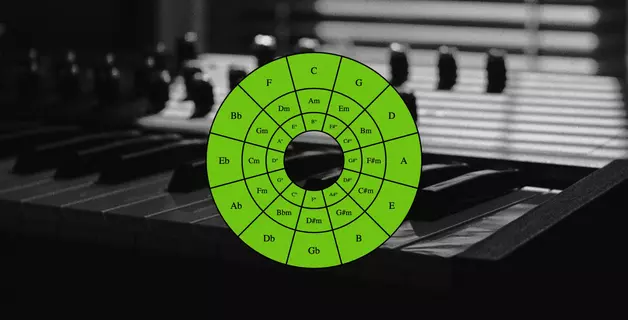
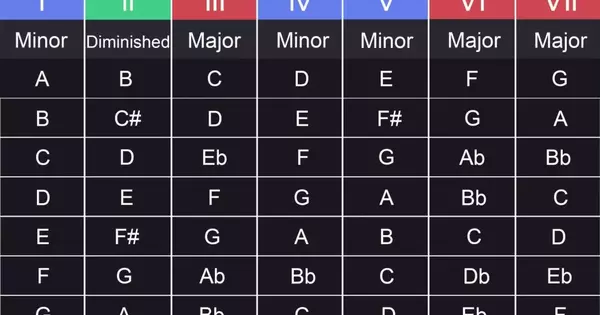
Build a chord on each note of your scale and you get the seven chords of the key. These are the diatonic chords, the ones made only from notes already in the key, and almost every progression is built from them. In C major they are:
| Numeral | Chord | Quality |
|---|---|---|
| I | C | major |
| ii | Dm | minor |
| iii | Em | minor |
| IV | F | major |
| V | G | major |
| vi | Am | minor |
| vii° | B | diminished |
The three major chords (I, IV, V) are called the primary chords, and together with the minor vi they do most of the work in popular music. Each of these chords is a triad, three notes from the scale played together.
Step 3: Anchor it with the home chord
Begin or end your progression on the I chord. That is the chord that sounds like a resting point. End on it and the loop closes neatly, feeling resolved. End on something else and the loop keeps pulling toward resolution.
Step 4: Add motion, then resolve
Pick one or two chords from the subdominant group to carry the progression away from home, then follow them with the dominant (V) to pull it back. A good starting point: I, then IV, then V, then back to I. That gives you a bright, open sound because IV is a major chord. Swap the IV for the minor vi and the progression picks up a more reflective quality. Swap it for the minor ii and the move into the V becomes smoother, closer to the jazz feel you hear in lo-fi hip-hop, neo-soul, and trip-hop.
Step 5: Play it against the rest of the song
Loop the progression and hum or program a simple melody over it. A progression does not work in a vacuum. It has to leave room for a tune and sit well with the groove. If you are writing the chords first, you shape the melody to fit them. Only when one chord keeps fighting the song is that a sign to reconsider that chord, not the whole loop.
Build Progressions in Amped Studio's Chord Creator
Chord Creator is Amped Studio's built-in chord progression generator, a tool that writes the chords of any key for you. It lets you write chord progressions online with nothing to install, and it works whether or not you know any theory.

To open it, double-click a track to make a clip, then double-click the clip to open the content editor and switch on Chord Creator. Set the Key and the Scale to major or minor, and it lays out the chords that belong to that key as buttons across the top. Those buttons are the diatonic chords from Step 2, picked for you.
Click the chords in the order you want, or open the Progressions menu to drop in a ready-made sequence and hear it straight away. Build in order: choose your first chord and try a few options, then your second, then your third, keeping the chord that resolves for the end. Because everything you make is MIDI, you can switch instruments, cycle through presets, or design a sound of your own, and choose or make a perfect timbre to play your chord sequence. Anything Chord Creator writes can be fine-tuned note by note in the piano roll of the MIDI editor.
Common Chord Progressions Worth Knowing
A few of these turn up so often that once you know them, you start hearing them in songs that sound nothing alike on the surface. These are the ones worth memorizing first.
| Name | Numerals | Feels like | Heard in |
|---|---|---|---|
| The four-chord progression | I–V–vi–IV | anthemic, versatile | Let It Be |
| The four-chord progression (starting with minor) | vi–IV–I–V | moody, bittersweet | Zombie |
| The three-chord progression | I–IV–V | direct, driving | La Bamba |
| The 12-bar blues | I–IV–V over 12 bars | rolling, bluesy | Johnny B. Goode |
| The two-five-one (the jazz cadence) | ii–V–I | smooth, resolving | Fly Me to the Moon |
| The doo-wop profression | I–vi–IV–V | nostalgic, sweet | Stand By Me |
Look at the first two rows: they are the same four chords in a different order. Starting on the minor vi instead of the major I is the whole difference between an arena anthem and a heartbreak ballad. Reordering chords you already have is often the quickest way to a progression that feels new.
Going Beyond the Diatonic Chords
The seven chords you pulled from your key in Step 2 are the diatonic chords. A progression built only from them can start to sound predictable, and the common fix is to borrow a chord from outside the key for a moment of color.
"Creep" by Radiohead is a great example. The song is in G major, and its loop is four chords: G, B, C, and Cm. Only the G and C belong to the key. The B should be B minor in G major, but Radiohead use B major, adding a flash of brightness before the drop. The Cm is the bigger move: the E in a normal C major chord drops to E flat, a note outside the key entirely, and that one note is where the song gets its restless quality.
Start Writing Your Own Chord Progressions
Plenty of producers start making music without music theory and pick up the concepts as they go. The fastest way to get better at writing chord progressions is to make them. Start with three chords in one key, get them looping, and keep going until the movement feels right to you. The more you do it, the faster you start hearing the difference between a progression that feels boring and one that keeps you listening.
When you would rather build by ear than by theory, Amped Studio's Chord Creator lets you make a chord progression in any key in a few clicks.
FAQ
A chord progression is a sequence of chords played in a set order, usually a short loop of two to six chords that repeats through a section of a song. It sets the key and gives the melody its harmony.
Every chord in a key plays one of three roles: a home chord that sounds settled, chords that step away and create motion, and a dominant chord that builds tension. The music travels out from home and resolves back, and that cycle of tension and release is what makes a progression feel complete.
Yes. A tool like Amped Studio's Chord Creator lays out the chords that fit a chosen key, so you can build a working progression by ear. Picking up a little theory later helps you understand why a sequence works, but you do not need it to start.
The simplest way to find the key of a chord progression is to look for the chord it keeps resolving to. A loop that keeps returning to C and uses F, G and Am is almost certainly in C major.
It is less a strict rule than the backbone of countless songs. I, IV and V are the three major chords of a key, the ones with the strongest pull, and putting them in different orders gives you most of blues, folk and early rock. Once you know these three chords, you already know how to write a chord progression in any major key.
Yes. A chord progression on its own cannot be copyrighted. Courts have treated progressions as shared building blocks no songwriter can own, which is why thousands of songs reuse the same chord sequences freely. Where it gets risky is when your melody also closely follows another song's melody over those same chords.
Start creating beats and songs in minutes. No experience needed — it's that easy.
Get started